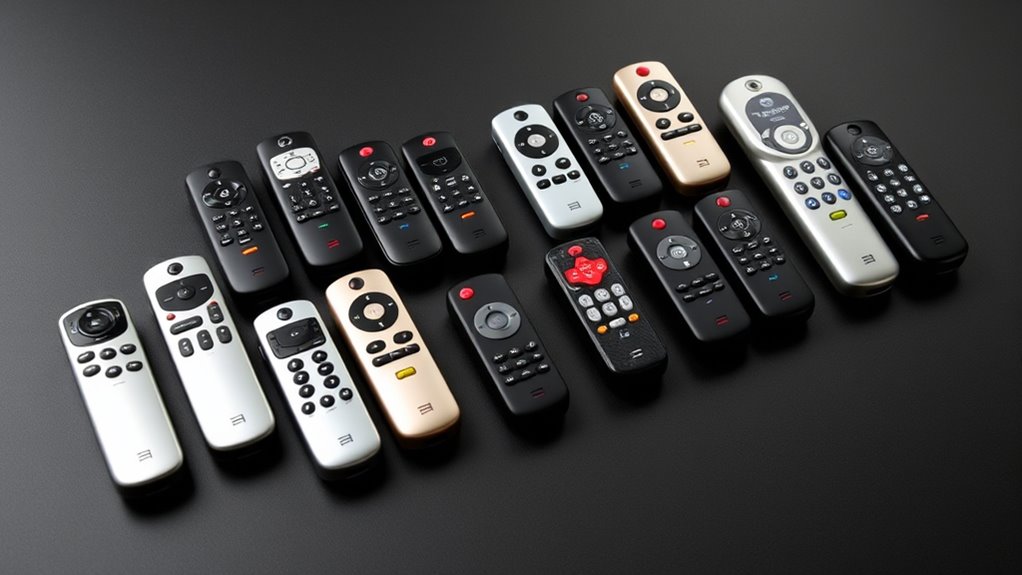

When selecting a wireless presentation remote with a laser pointer, the key considerations include ease of use, laser visibility, range, and compatibility. The Logitech Spotlight stands out as the best overall choice thanks to its intuitive design and versatile features. For those on a budget, the Presentation Clicker for PowerPoint offers reliable performance at a lower price, while the Green Light Presentation Clicker is ideal for educators needing a rechargeable option. Balancing performance, price, and usability can be challenging, as some remotes excel in range but lack advanced controls, while others may be feature-rich but less user-friendly. Continue reading for a detailed breakdown of each option and what makes them unique.

Prime made for students and young adults
- Fast, free delivery for dorm and study essentials
- Prime Video and Amazon Music included
- Member-only deals
Key Takeaways
- The top-ranking remotes combine long-range connectivity with intuitive laser pointer controls, making them versatile for various presentation settings.
- Rechargeable models like the Green Light Presentation Clicker offer greater convenience and sustainability over battery-powered options.
- Higher-end remotes, such as Logitech Spotlight, provide customizable buttons and advanced features, but come at a premium price.
- Budget options tend to prioritize straightforward laser pointing and basic controls, which may limit advanced functionalities.
- Compatibility and receiver type (USB-A vs USB-C) significantly influence ease of setup and overall usability across different devices.




More Details on Our Top Picks
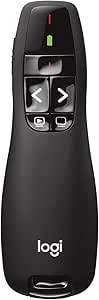
Logitech Wireless Presenter R400 USB PowerPoint Clicker with Laser
The Logitech R400 stands out as a straightforward, reliable choice for users who prioritize ease of use and consistent performance. Its plug-and-play setup ensures no software fuss, making it ideal for those who want immediate functionality. The bright red laser pointer enhances audience engagement, while the impressive 50-foot range offers freedom to move around the room. Compared to the DinoFire model, the R400’s simplicity is a plus—no extra connections or compatibility concerns—but it’s limited to Windows, which could be a drawback for Mac users. The built-in receiver storage adds to its portability, perfect for frequent presenters. However, reliance on AAA batteries and a laser that might be too intense against certain backgrounds are notable tradeoffs. Overall, this remote suits users seeking a dependable, no-fuss device for standard presentations.
Pros:- Simple plug-and-play setup with no software installation
- Bright laser pointer for effective highlighting
- Long wireless range up to 50 feet
- Compact with built-in receiver storage for portability
Cons:- Requires AAA batteries which are not included
- Limited to Windows systems
Best for: Office professionals or educators who need a straightforward, reliable presenter with a bright laser pointer and long-range capability.
Not ideal for: Mac users or those wanting rechargeable batteries, as the R400 only works with Windows and requires disposable AAA batteries.
- Wireless Range:Up to 50 feet
- Laser Type:Class 2 red laser
- Batteries Required:AAA (not included)
- Connectivity:2.4 GHz RF wireless
- Receiver Storage:Built-in docking bay
- System Requirements:Windows XP, Vista, USB port
Our verdict“This pick is perfect for Windows users seeking a reliable, easy-to-use presenter with a bright laser and ample range.”
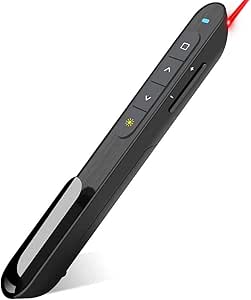
Presentation Clicker for PowerPoint Wireless Remote Control with Red Laser
This ergonomic remote offers impressive versatility, supporting Windows, Mac, and Linux, making it suitable for diverse environments. Its long-range capability of up to 100 feet surpasses the Logitech R400, making it ideal for large classrooms or conference halls. The compact, lightweight design ensures comfortable handling during extended sessions. Unlike the DinoFire, which might require initial setup, this device’s simple design minimizes compatibility issues. The laser pointer adds visual focus, but its range can be less effective in brightly lit environments, and the single AAA battery lasts about two months, which might be inconvenient for frequent use. Overall, this remote is best suited for users who need broad OS support and extended control distance without complex features.
Pros:- Ergonomic, comfortable design for prolonged use
- Supports multiple operating systems including Linux
- Long wireless range up to 100 feet
- Laser pointer enhances presentation focus
Cons:- Requires one AAA battery, which needs replacement every two months
- No included carrying case
- Laser range may diminish in brightly lit rooms
Best for: Educators or conference speakers who need a versatile, cross-platform remote with a long control range.
Not ideal for: PowerPoint users who prefer extensive software features or rechargeable batteries, as it only uses a single AAA and has limited advanced functions.
- Design:Ergonomic, compact
- Compatibility:Windows, Mac, Linux
- Control Distance:98 ft / 30 m
- Laser Pointer Range:328 ft / 100 m
- Size:109mm
- Weight:38g
Our verdict“This remote excels for those needing broad OS compatibility and a long control distance for larger venues.”
DinoFire USB Type C Wireless Presenter Remote Clicker with Red Pointer and Long Range
The DinoFire remote distinguishes itself with dual USB-A and USB-C connectivity, making it compatible with a broad array of devices, including MacBooks and PCs. Its impressive wireless range of up to 165 feet provides flexibility in large settings, outperforming many competitors like the Logitech R400 and Presentation Clicker. The bright red pointer ensures effective highlighting, and its multifunctional controls including slide navigation and volume make it a comprehensive tool. However, its performance on LCD or LED screens can be inconsistent, and Mac users might face some setup hurdles. It’s a solid choice for those who need a long-range, multi-device compatible remote with a bright pointer, but less suitable for environments where screen compatibility is critical.
Pros:- Dual USB-A & USB-C compatibility for broad device support
- Long wireless range up to 165 feet
- Bright red pointer for clear highlighting
- Supports multiple device types including Mac and PC
Cons:- Not recommended for LED or LCD screens due to potential display issues
- May require simple setup for Mac compatibility
Best for: Conference or classroom presenters using multiple device types who need maximum range and versatile connectivity.
Not ideal for: Users primarily presenting on LED screens or those seeking plug-and-play simplicity, as setup may require some initial configuration.
- Connections:USB-A & USB-C
- Range:98-165 feet
- Pointer Color:Red
- Compatibility:MacBook, PC
Our verdict“Ideal for users needing maximum wireless range and multi-device support in large or flexible environments.”
Logitech Spotlight Presentation Remote Wireless – Black
The Logitech Spotlight elevates presentation control with advanced features like highlighting, magnifying, and customizable effects, making it a premium choice for users who want more than basic slide control. Its dual connectivity options—USB-A receiver and Bluetooth—offer flexibility, but full functionality requires installing the Logi Options+ app, which can be a hurdle for some. Unlike dedicated laser pointers, Spotlight’s highlighting features help emphasize content without a traditional laser, which may be less effective in brightly lit environments. The device is best suited for tech-savvy users who want integrated content control and detailed customization, yet it lacks details on battery life or charging, which could be a downside for constant use.
Pros:- Wireless via USB-A or Bluetooth for versatile setup
- Advanced highlighting and magnifying features
- Customizable effects via Logi Options+
- Supports multiple presentation platforms
Cons:- Requires setup with Logi Options+ for full features
- Limited to Logitech’s ecosystem and software
- No details on battery life or recharging
Best for: PowerPoint or keynote users who want advanced highlighting, magnifying, and customizable presentation effects with flexible connectivity.
Not ideal for: Users seeking a simple, budget-friendly laser pointer remote without extensive software setup or advanced features.
- Connectivity:USB-A receiver and Bluetooth
- Compatibility:Windows, Mac
- Features:Highlight, magnify, cursor control
Our verdict“This remote is ideal for tech-savvy presenters wanting advanced control and customization over their presentation experience.”
Wireless Presentation Clicker with Laser Pointer for PowerPoint
This lightweight remote offers a substantial laser pointer range of up to 100 meters, making it suitable for large rooms or outdoor presentations. Its ergonomic design ensures comfortable handling, and the plug-and-play setup simplifies use for users who dislike complicated installations. It’s compatible with a wide range of operating systems and software, including Windows, Mac, and Linux, positioning it as a flexible option. Compared to the Logitech R400, it provides a similar laser range but with a slightly heavier build at 58 grams, which could impact comfort during extended use. The need for two AAA batteries and limited visibility of the laser in bright environments are common tradeoffs. This device makes sense for those prioritizing long-range control at a budget.
Pros:- Long wireless range up to 328 feet / 100 meters
- Ergonomic, lightweight design for comfort
- Plug-and-play setup with no installation needed
- Compatible across multiple operating systems
Cons:- Requires two AAA batteries which are not rechargeable
- Laser pointer visibility may be limited outdoors or in bright rooms
Best for: Event presenters or educators working in large spaces who need a highly portable, long-range laser pointer with easy setup.
Not ideal for: Frequent users who prefer rechargeable batteries or present in very bright environments where laser visibility may suffer.
- Range:98 ft / 30 m (PowerPoint control)
- Laser pointer range:328 ft / 100 m
- Battery:2 AAA (included)
- Weight:58g
- Compatibility:Windows, Mac, Linux
Our verdict“This remote is suitable for those needing extensive control range and portability in large or outdoor settings.”
Logitech Wireless Presenter R500s PowerPoint Clicker with Laser Pointer
The Logitech R500s stands out for its broad compatibility across multiple operating systems and presentation software, making it a versatile choice for various users. Its impressive 20-meter (65-foot) range provides ample freedom of movement, especially compared to products like the QUI Presentation Clicker, which has a similar long-range but fewer connectivity options. The dual connectivity via USB or Bluetooth offers flexibility, yet the need for software installation on Mac and Windows can be a hurdle for some users. Its 12-month battery life with smart power management reduces interruptions, though the laser pointer’s visibility dims in bright environments, which may limit its effectiveness in well-lit rooms. This model makes the most sense for presenters who value compatibility and range but are okay with minor setup requirements.
Pros:- Universal compatibility with Windows, Mac, iOS, Android, and popular presentation apps
- Long 20-meter range offers great freedom of movement
- Dual connectivity via USB receiver and Bluetooth adds convenience
- Battery lasts up to 12 months with smart power management
Cons:- Requires software installation for full functionality on some platforms
- Laser pointer less visible in brightly lit environments
Best for: Professionals needing a reliable, long-range presenter compatible with multiple systems and software.
Not ideal for: Casual users or those seeking a plug-and-play device without any software installation or setup complexity.
Our verdict“Ideal for users who need a versatile, long-range remote with broad compatibility and are comfortable with some setup.”
Wireless Presentation Clicker Remote for PowerPoint, Presenter
This remote excels with its extraordinary wireless range of up to 98 feet for clicker control and 328 feet for laser pointer use, surpassing many competitors like the Logitech R500s in distance. Its ergonomic design ensures comfortable handling during extended sessions, though the reliance on two AAA batteries—without recharging options—can be a drawback for frequent use. The plug-and-play USB receiver supports both USB-A and USB-C devices, making it highly adaptable, but the laser’s excessive range might be unnecessary for smaller rooms, potentially causing distraction. This pick makes the most sense for speakers who need to move freely across large venues or auditoriums, where distance is critical.
Pros:- Extraordinary wireless control range of 98 feet and laser reach of 328 feet
- Ergonomic design for comfortable use over long periods
- Plug-and-play USB receiver compatible with multiple device types
- Supports multiple operating systems
Cons:- Requires two AAA batteries, not rechargeable
- Laser range may be overkill for small rooms, risking distraction
Best for: Presenters in large conference halls or auditoriums who require maximum wireless range and portability.
Not ideal for: Small classroom or meeting room presenters who don’t need such extensive range and prefer rechargeable batteries.
Our verdict“Best suited for presenters who prioritize maximum mobility and control over large presentation spaces.”
Wireless Presenter with Hyperlink and Volume Control, RF 2.4GHz USB PowerPoint Clicker
This remote combines essential presentation controls with added features like hyperlink support and volume adjustment, making it a strong choice for professional settings. Its 100-foot wireless range is respectable but less than the ultra-long-range options, such as the one from the DinoSTRIKE. The bright red laser pointer ensures high visibility, yet it’s not recommended for LCD or LED screens, limiting its versatility in some environments. The plug-and-play operation simplifies setup, but reliance on AAA batteries and the absence of rechargeable options could be inconvenient for frequent users. This device makes the most sense for professionals seeking integrated multimedia controls without complicated setup.
Pros:- Easy to set up with plug-and-play design
- Long wireless range of up to 100 feet
- Bright red laser pointer for clear visibility
- Includes hyperlink and volume control features
Cons:- Not recommended for LCD/LED screens due to laser brightness
- Requires AAA batteries, which are not rechargeable
Best for: Corporate presenters who need easy setup, reliable wireless range, and extra features like hyperlink support.
Not ideal for: Users requiring a laser pointer suitable for brightly lit or large screens, or those preferring rechargeable batteries.
Our verdict“Best for professionals who want integrated multimedia controls with reliable wireless performance.”
QUI Presentation Clicker with Volume Control, Wireless Presenter Remote
The QUI Presentation Clicker is designed for broad compatibility, supporting Windows, Mac, Linux, and Android, making it suitable for diverse environments. Its impressive wireless range of up to 328 feet is comparable to high-end models like the DinoSTRIKE, providing room to move across large spaces, though this might be excessive for smaller rooms. The bright red pointer enhances slide visibility, and the plug-and-play setup simplifies operation. However, the limited functionality—lacking advanced features like hyperlink support—may be a drawback for users seeking more control options. Its straightforward design and long range make it ideal for those who prioritize compatibility and simple operation over extra features.
Pros:- Supports Windows, Mac, Linux, and Android
- Long wireless range of up to 328 feet
- Bright red laser pointer for large-room visibility
- Plug-and-play operation for ease of use
Cons:- Lacks advanced features like hyperlink support
- Uses AAA batteries without rechargeable options
Best for: Educators or conference speakers needing reliable, broad compatibility with basic control features over large spaces.
Not ideal for: Users wanting advanced presentation features like hyperlink support or those who prefer rechargeable batteries.
Our verdict“Ideal for users who need broad compatibility and a long-range remote with straightforward controls.”
DINOSTRIKE Wireless Presenter Remote with Air Mouse Control, Rechargeable USB Presentation Clicker for Computer, Laptop, Mac
The DINOSTRIKE offers a unique combination of air mouse functionality and a bright red laser pointer, making it suitable for dynamic presentations where control versatility matters. Its 164-foot wireless range is impressive, especially compared to typical remotes and even the QUI model. The rechargeable battery is a major plus, reducing ongoing costs and environmental impact, though the device supports only one system at a time—limiting multi-platform flexibility. The control range is more than enough for large venues, but some users may find the extensive range unnecessary for smaller rooms, where simpler remotes suffice. This pick is ideal for tech-savvy presenters seeking multifunctionality and recharging convenience.
Pros:- Long wireless control range of up to 164 feet
- Rechargeable battery with quick 3-hour charge
- Includes air mouse control for versatile presentation options
- Supports multiple systems including Windows, Mac, Linux, Android
Cons:- Supports only one device at a time, limiting multi-tasking
- USB receiver may be lost inside the device
Best for: Tech-savvy professionals and educators who want a multi-functional remote with air mouse features and long-range control.
Not ideal for: Users with basic presentation needs or those working exclusively in small, controlled environments where long-range features are irrelevant.
Our verdict“Best for tech-oriented users who want multifunctionality and rechargeable convenience for large or dynamic presentations.”
Green Light Presentation Clicker for Teachers – USB-C Rechargeable Wireless Presenter for PowerPoint, Keynote, Google Slides
This presentation clicker stands out for its highly visible green laser, which remains clear even on brightly lit screens, making it ideal for classrooms or large conference rooms. Compared with the Logitech R800, which uses a green laser with a dedicated LCD timer, this model focuses on visibility over extended features. Its USB-C rechargeable design offers convenience, eliminating battery replacements, but it limits compatibility to devices with USB-C ports, which might require adapters for some users. The intuitive button layout makes navigation straightforward, especially for educators who need quick control. However, its laser is less suitable for environments with strict laser safety regulations, and it’s limited to presentation control only. If visibility in bright settings is a priority, this pick delivers.
Pros:- Highly visible green laser for clear projection on all screens
- USB-C rechargeable for hassle-free power management
- Plug-and-play compatibility with Mac, Windows, and Chromebooks
- Lightweight and compact for easy handling
Cons:- Limited to presentation control only, no additional functions
- Requires USB-C port for charging, which may need adapters
- Green laser may pose safety concerns in sensitive environments
Best for: Educators and trainers who need a laser pointer that cuts through bright projectors and screens.
Not ideal for: Business professionals requiring advanced control features or compatibility with older devices without USB-C ports.
- Light Color:Green (532nm)
- Power Source:USB-C rechargeable
- Compatibility:Mac, Windows, Chromebook
- Battery:Built-in rechargeable
- Connectivity:Wireless, USB receiver
Our verdict“This is the best choice for educators or presenters who prioritize laser visibility over extra features.”
Presentation Clicker with USB-A & USB-C Receiver, 2.4GHz Wireless Remote with Volume Control & Red Light Pointer for PowerPoint and More
This model offers a robust 100-foot wireless range, making it suitable for large rooms or outdoor presentations, surpassing the Logitech R800’s 100-foot range for mobility. Its dual USB-A and USB-C receivers ensure broad device compatibility, unlike the Green Light Clicker, which is limited by USB-C only. The inclusion of volume control and a bright red laser pointer adds to its versatility, especially for interactive sessions. The use of AAA batteries, however, means ongoing replacement costs, and the lack of a rechargeable option can be inconvenient for frequent use. Its range and multi-device support are ideal for dynamic environments, but the need for batteries and limited customization might deter power users.
Pros:- Long wireless range up to 100 feet for unrestricted movement
- Universal compatibility with USB-A and USB-C devices
- Bright red laser pointer suitable for large rooms
- Includes volume control for multimedia integration
Cons:- Batteries are not included, requiring additional purchase
- Uses AAA batteries, which may need frequent replacement
- Lacks rechargeable battery option, increasing long-term costs
Best for: Professionals who need extensive movement freedom and compatibility across various devices and operating systems.
Not ideal for: Casual users or those seeking a rechargeable, eco-friendly option for infrequent presentations.
- Connectivity Technology:Radio Frequency
- Maximum Range:20 meters (approx. 65 feet)
- Button Quantity:5
- Controller Type:Button Control
- Supported Devices:Mac, PC, Linux
- Light Pointer:Red laser
Our verdict“Ideal for users who prioritize range and device compatibility over rechargeable features.”
Wireless PowerPoint Presentation Clicker with Protective Storage Case
This remote combines a long wireless control range of nearly 98 feet with an impressive laser pointer reach of up to 328 feet, making it suitable for large venues or outdoor use. Its rechargeable battery offers quick charging, reducing downtime, unlike models that rely on nonstandard batteries. The device supports multiple operating systems, including Windows, Mac, Linux, and Android, providing flexibility for varied setups. Its ergonomic design ensures comfortable handling during extended sessions. However, the laser range may be overkill for typical indoor presentations and could pose safety concerns if misused. The nonstandard battery type might also be less accessible for some users. Still, for those needing extensive reach and seamless compatibility, this remote fits well.
Pros:- Up to 98 feet wireless control range for freedom of movement
- Laser pointer reaches up to 328 feet for large spaces
- Rechargeable battery with quick charging capabilities
- Supports multiple OS including Windows, Mac, Linux, Android
Cons:- Requires nonstandard rechargeable batteries, which may be less common
- Laser pointer range might be excessive for typical indoor settings
- Limited to supporting one device at a time
Best for: Large venue speakers or educators requiring long-range control and cross-platform compatibility.
Not ideal for: Casual presenters or those with limited device options who don’t need extensive laser range or long-distance control.
- Wireless Control Distance:98 feet / 30 meters
- Laser Pointer Range:328 feet / 100 meters
- Connectivity:Radio Frequency
- Battery Type:Rechargeable
- Supported OS:Windows, Mac, Linux, Android
Our verdict“Best suited for those who need extensive control range and multi-platform support in large or outdoor environments.”
Logitech Wireless Presenter R800 PowerPoint Clicker with Green Laser
The Logitech R800 is renowned for its vivid green laser, which remains visible on LCD and plasma screens, setting it apart from other models like the B09J29JQNC, which uses a less visible laser. Its 100-foot range offers presenters freedom of movement, complemented by an LCD timer with silent alerts for better pacing. The plug-and-play USB receiver simplifies setup, though its compatibility is limited mostly to Windows XP and Vista, which could be restrictive for some users. The absence of specified battery details leaves questions about duration, and it lacks advanced features like volume control or device switching. For those prioritizing laser visibility on modern screens, this remote offers a reliable solution.
Pros:- Bright green laser visible on LCD and plasma screens
- Long wireless range of up to 100 feet
- Simple plug-and-play USB receiver setup
- Built-in LCD timer with silent alerts
Cons:- Battery life and specifics are not detailed
- Limited compatibility with newer or non-Windows systems
- No mention of included batteries or rechargeable options
Best for: Business professionals needing a highly visible laser pointer and straightforward operation for large presentations.
Not ideal for: Users with modern Macs or Linux systems who require broader compatibility or additional functions.
- Laser Color:Green
- Range:100 feet (30 meters)
- Wireless Frequency:2.4 GHz
- Power Source:Battery (not specified)
- Compatibility:Windows XP, Vista
Our verdict“Ideal for professionals prioritizing laser visibility and straightforward controls over advanced features.”
Wireless Presentation Remote Clicker for PowerPoint and More
This clicker offers a practical balance of features, including a laser pointer with an 82-foot range, and functions such as page navigation, hyperlink, and volume control, making it suitable for diverse presentation scenarios. Compared to the more specialized models like the Green Light Clicker, it’s more versatile but with a shorter laser range. Its plug-and-play USB receiver simplifies setup, and support across Windows, Mac, Linux, and Android adds to its flexibility. The limited number of buttons—just four—restricts advanced control, and the power source remains unspecified, raising questions about long-term battery management. This device makes a solid choice for users seeking multi-functionality without overcomplicating the setup.
Pros:- Long wireless range of up to 82 feet for flexible movement
- Supports multiple functions like hyperlink, volume, and screen switching
- Plug-and-play with a magnetic, easy-to-store receiver
- Compatible with various operating systems and software
Cons:- Laser pointer may not be suitable for use with LED or LCD screens
- Limited to basic functions with only four buttons
- Unspecified power source, which could impact battery life
Best for: Educators or business presenters who want a reliable, multi-purpose remote with decent range.
Not ideal for: Power users requiring extensive control options or users with strict safety concerns about laser use on LED screens.
- Laser Pointer Range:82 feet
- Maximum Distance:656 feet
- Compatibility:Windows, Mac, Linux, Android
- Receiver:Magnetic, USB
- Buttons:4
Our verdict“Best for those seeking versatile functions in a wireless remote with moderate laser range and broad OS support.”

How We Picked
Products were evaluated based on a combination of performance, build quality, ease of use, range, and feature set. We prioritized remotes that provide reliable wireless connectivity, clear laser pointers, and compatibility with common presentation platforms like PowerPoint and Google Slides. Durability and ergonomic design also played key roles, as a comfortable, well-built remote enhances presentation flow. Price-to-value ratios were considered to identify options that deliver quality without unnecessary premium costs. The ranking reflects a balance between affordability and advanced functionality, aiming to recommend options suitable for different user needs and budgets.Factors to Consider When Choosing Wireless Presentation Remotes With Laser Pointer
Choosing the right wireless presentation remote with laser pointer involves understanding several key factors that impact usability and performance. Beyond evaluating features listed in product reviews, buyers should consider how each factor aligns with their specific presentation environment, frequency, and technical setup. Making informed choices can prevent common pitfalls like incompatible receivers or limited range, ensuring a smooth presentation experience in any setting.Range and Connectivity
Range determines how far you can move from your computer while still controlling your presentation. Most remotes use 2.4GHz RF or Bluetooth, with RF generally offering longer, more stable connections. Consider your typical presentation size; larger rooms benefit from models with at least 30 meters of range. Additionally, check whether the remote connects via USB-A or USB-C, as this affects compatibility with your device. Some remotes also support dual connectivity options, which can be advantageous for versatile setups.
Laser Pointer Visibility and Control
The laser pointer must be bright and easily visible on screens or projectors. Red lasers are standard, but models with green lasers tend to be more visible in bright environments, especially for larger audiences. Ease of activation matters—look for simple button placement and tactile feedback. Some remotes allow continuous laser operation, while others need to be held down, which affects usability during longer presentations. Choosing a remote with adjustable laser brightness can also be beneficial for different lighting conditions.
Battery Life and Power Options
Long battery life reduces interruptions during presentations. Some remotes use replaceable batteries, which can be convenient but may add ongoing costs. Others feature rechargeable batteries, often via USB-C, offering a more eco-friendly and hassle-free experience. Consider your presentation frequency; frequent users should prioritize models with at least several weeks of battery life. Also, look for remotes with low power consumption modes or quick charging capabilities to maintain productivity.
Compatibility and Ease of Setup
Ensure the remote is compatible with your operating system and presentation software. Most models support Windows and macOS, but some might also work with Android or Chrome OS. Plug-and-play USB receivers simplify setup, especially for less tech-savvy users, while Bluetooth models offer wireless flexibility without additional dongles. Check for driver requirements or software customization options, as these can enhance control and usability. A stable connection setup is critical to prevent lag or disconnection during important moments.
Additional Features and Ergonomics
Extra controls like volume adjustment, hyperlink navigation, or air mouse functions can enhance presentation control, especially for advanced users. Ergonomic design, with comfortable grips and well-placed buttons, helps prevent fatigue during lengthy sessions. Some models include protective cases or clip-ons for portability. Consider whether you prefer a compact, lightweight remote for travel or a more substantial design for extended use. Balancing features and comfort ensures a remote that integrates seamlessly into your presentation style.
Frequently Asked Questions
Can I use a wireless presentation remote with my Mac and Windows laptop?
Yes, most wireless presentation remotes are designed for cross-platform use, supporting both Mac and Windows operating systems. However, it’s advisable to verify compatibility with your specific device and software. Some remotes may require driver installation or software updates to function fully, especially for advanced features. Wireless remotes with standard USB receivers or Bluetooth connectivity generally work seamlessly without additional setup, making them suitable for mixed environments.
How important is laser pointer brightness for presentations in bright rooms?
Laser pointer brightness significantly impacts visibility, especially in well-lit or large rooms. Red lasers are standard but may be less visible in bright environments, whereas green lasers tend to be more conspicuous and easier for audiences to see. If you frequently present in bright settings, choosing a remote with a high-quality green laser can improve audience engagement and clarity. Always check the laser’s specifications and user reviews to confirm its visibility in various lighting conditions.
Do wireless presentation remotes with laser pointers drain batteries quickly?
The battery life of wireless remotes varies based on usage and features. Models with simple laser pointers and basic controls often have long-lasting batteries, sometimes lasting months. More advanced remotes with additional features like volume controls or air mouse functions may consume more power. Rechargeable models typically offer a more consistent experience and reduce ongoing costs. To avoid interruptions, select a remote with a known good battery life suited to your presentation frequency.
Is it better to choose a remote with a rechargeable battery or replaceable batteries?
Rechargeable remotes provide convenience and are more environmentally friendly, as they eliminate ongoing battery purchases. They also tend to have consistent power levels and quick charging options. Replaceable batteries might be preferable if you want a remote that can operate for extended periods without recharging or if you prefer swapping batteries on the fly. Consider your usage pattern—frequent presenters often benefit from rechargeable models, while occasional users may prefer the simplicity of replaceable batteries.
What should I look for in a wireless remote to ensure it’s durable and travel-friendly?
Durability and portability are key for frequent travelers or users who carry their remotes to different venues. Look for remotes with sturdy construction, impact-resistant materials, and protective cases or covers. Compact size and lightweight design enhance portability, while features like a clip or lanyard attachment improve ease of transport. Additionally, check user reviews for reports on longevity and build quality, as a well-made remote reduces the risk of damage during transport.
Conclusion
For general use, the Logitech Spotlight remains the best overall for its balance of advanced features and ease of use. Budget-conscious users will find the Presentation Clicker for PowerPoint a reliable choice that doesn’t sacrifice core functionality. Educators or those needing a rechargeable option should consider the Green Light Presentation Clicker for its convenience. Beginners or infrequent presenters might prioritize simple, straightforward models, while professionals needing customizable controls should look towards premium options like Logitech Spotlight or R800. Your choice ultimately depends on your specific presentation environment and feature priorities.