A wireless vibration sensor kit for assets can alert you when equipment, a cabinet, a window, or another monitored item is moved or struck, but the right pick depends on how you want alerts delivered. My best overall choice is the YoLink Smart Vibration and Shock Sensor Kit with Hub, which pairs a sensor with its hub rather than leaving connectivity as a separate purchase. The Aqara Zigbee Sensor and Hub Kit stands out for smart-home integrations, while ThirdReality’s Zigbee sensors suit buyers who want a loud local alarm and already have a compatible hub. The main tradeoffs are hub requirements, alert options, system compatibility, and whether a sensor made for doors and glass fits asset monitoring. Read on for the full breakdown and help matching a kit to your setup.

Get school and study supplies delivered free — and shop member deals
- Fast, free delivery on millions of items
- Access to Prime Big Deal Days deals on October 6–7
- Prime Video, Amazon Music and more included
Key Takeaways
- Included hubs change the starting point: The YoLink and Aqara kits bundle a hub, while the listed Aqara and ThirdReality Zigbee sensors depend on compatible hub arrangements.
- Smart-home compatibility is not universal: Aqara and ThirdReality name specific ecosystems, so buyers should check their existing hub and automation setup before choosing.
- Four-packs favor broader coverage: The WiFi and SENCKIT four-packs and ThirdReality three-pack suit multi-point monitoring better than a single sensor, though more sensors do not guarantee better asset alerts.
- Local alarms and remote alerts solve different problems: ThirdReality emphasizes a 110dB alarm, while app-connected options focus on sending notifications; decide which response matters most.
- The Arduino module has a different purpose: The WTVB01-BT50 is a three-axis module for development projects, not a ready-made consumer alarm kit.
| YoLink Smart Vibration and Shock Sensor Kit: 1-Pack + Hub |  | Best for Long-Range Asset Monitoring | Included units: 1 vibration sensor and 1 hub | Wireless technology: LoRa | Maximum range: Up to 2,034 feet (0.25 miles) | VIEW ON AMAZON | See Our Full Breakdown |
| WiFi Vibration Sensor: Smart Door Window Sensor with App Alerts, Wireless Glass Break Detector, Adjustable Sensitivity (4 Pack) |  | Best for Multi-Point Coverage | Pack size: 4 sensors | Working voltage: DC 3V | Battery: 2 AAA batteries per sensor, included | VIEW ON AMAZON | See Our Full Breakdown |
| Haozee Smart Vibration Sensor Alarm, Real-time Monitoring |  | Best for Zigbee Smart-Home Setups | Sensor functions: Vibration and tilt | Sensor technology: Vibration sensor | Connectivity: Zigbee; gateway required for full functionality | VIEW ON AMAZON | See Our Full Breakdown |
| WiFi Vibration Sensor – Smart Door/Window Sensor with App Alerts |  | Best for Simple Single-Point Setup | WiFi standard: 802.11b/g/n, 2.4 GHz | Transmission distance: 10–30 meters | Battery: 2 AAA batteries, included | VIEW ON AMAZON | See Our Full Breakdown |
| Wireless Glass Break Detector with App Alerts and Adjustable Sensitivity |  | Best for Basic Window Alerts | Pack size: 1 sensor | Sensor technology: Vibration | Power source: Battery powered | VIEW ON AMAZON | See Our Full Breakdown |
| WTVB01-BT50 Smart Vibration Module – 3-Axis Wireless Vibration Sensor for Arduino | 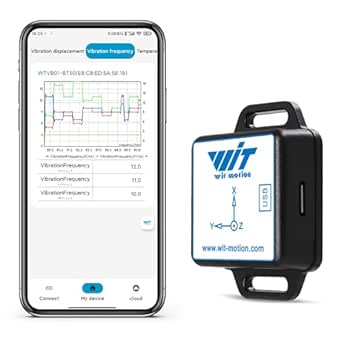 | Best for Machine Condition Monitoring | Sensing: Three-axis vibration and temperature | Vibration displacement: 0–30,000 µm | Speed range: 0–50 mm/s | VIEW ON AMAZON | See Our Full Breakdown |
| SENCKIT Smart Vibration Sensor 4-Pack: Wireless Glass Break & Door Detector with App Alerts |  | Best for Wi-Fi Multi-Point Coverage | Quantity: Four sensors | Connectivity: 2.4 GHz Wi-Fi | Power: Two AAA batteries included | VIEW ON AMAZON | See Our Full Breakdown |
| Aqara Zigbee Vibration Sensor & Zigbee Hub Kits, Wireless Mini Glass Break Detector for Alarm System and Smart Home Automation, Compatible with Apple HomeKit, Works with IFTTT |  | Best for Smart-Home Automation | Kit contents: Two items: Zigbee vibration sensor and hub | Detection: Vibrations, tilts, and drops | Compatible devices: Apple Home, Amazon Alexa, Home Assistant, iOS, and Android | VIEW ON AMAZON | See Our Full Breakdown |
| ThirdReality Smart Vibration Sensor with 110dB Alarm, Zigbee Hub Required, Adjustable Sensitivity, Compatible with SmartThings, Home Assistant, Echo Devices | 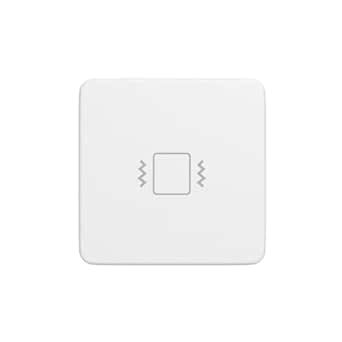 | Best Single Sensor with Local Alarm | Connectivity: Zigbee 3.0; hub required | Compatibility: SmartThings, Home Assistant (ZHA/Z2M), Echo devices, Hubitat, and Third Reality smart hub Gen2 | Sensitivity: Four adjustable levels via physical switches | VIEW ON AMAZON | See Our Full Breakdown |
| ThirdReality Zigbee Vibration Sensor 3 Pack with 110dB Alarm, Compatible with SmartThings, Home Assistant, Echo Devices | 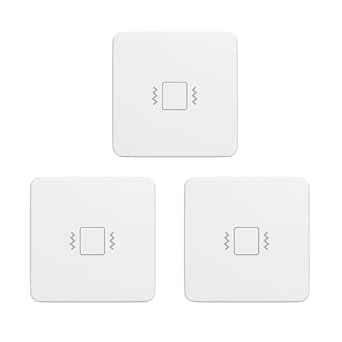 | Best Zigbee Multi-Asset Pack | Quantity: Three sensors | Connectivity: Zigbee 3.0; hub required | Compatibility: SmartThings, Home Assistant (ZHA/Z2M), Echo devices, Hubitat, and Third Reality smart hub | VIEW ON AMAZON | See Our Full Breakdown |
| YoLink Smart Vibration & Shock Sensor, YS7201 |  | Best for Long-Range Asset Monitoring | Sensor type: Vibration and shock sensor | Connectivity: Wireless LoRa | Maximum range: 400 meters | VIEW ON AMAZON | See Our Full Breakdown |
| wireless vibration sensor kit for asset | Connectivity |
|---|---|
| YoLink Smart Vibration and Sho | — |
| WiFi Vibration Sensor: Smart D | — |
| Haozee Smart Vibration Sensor | Zigbee; gateway required for full functionality |
| WiFi Vibration Sensor | — |
| Wireless Glass Break Detector | — |
| WTVB01-BT50 Smart Vibration Mo | Bluetooth 5.0 |
| SENCKIT Smart Vibration Sensor | 2.4 GHz Wi-Fi |
| Aqara Zigbee Vibration Sensor | — |
| ThirdReality Smart Vibration S | Zigbee 3.0; hub required |
| ThirdReality Zigbee Vibration | Zigbee 3.0; hub required |
| YoLink Smart Vibration & Shock | Wireless LoRa |
More Details on Our Top Picks
YoLink Smart Vibration and Shock Sensor Kit: 1-Pack + Hub
For an asset located far from the home router or hub, I’d favor the YoLink Vibration and Shock Sensor Kit over the WiFi-based Tuya sensors in this group. Its LoRa range of up to 2,034 feet can make it practical for monitoring a detached garage, shed, or other outbuilding, while the included hub provides the bridge to app alerts. The sensor is described for movement, shock, tampering, and theft, giving it a broader use than a window-focused vibration detector. The tradeoff is that this is a single-sensor kit, and setup depends on a compatible smartphone, 2.4 GHz WiFi, and the YoLink ecosystem. It also lacks an included siren, so it reports activity rather than sounding a local alarm.
Pros:- LoRa wireless range is specified up to 2,034 feet for coverage beyond typical indoor sensor links.
- Includes both the vibration sensor and hub needed for the described setup.
- Designed to detect movement, shock, tampering, and theft.
- Battery powered and described as easy to install.
Cons:- Only one vibration sensor is included, unlike the four-pack WiFi sensor option.
- Setup requires a compatible smartphone and 2.4 GHz WiFi.
- No siren or additional sensors are included, and the system uses the YoLink app ecosystem.
Best for: Owners monitoring a valuable item or entry point in a detached garage, shed, or other location where ordinary indoor WiFi sensor range may fall short.
Not ideal for: Buyers who want several sensors in one kit, a built-in siren, or a system that avoids a dedicated app and hub.
- Included units:1 vibration sensor and 1 hub
- Wireless technology:LoRa
- Maximum range:Up to 2,034 feet (0.25 miles)
- Power source:Battery powered
- Alert type:Motion
- Control method:App
- Compatible device:Smartphone
- Warranty:2 years
Our verdict“Choose this kit when long-range coverage for a remote asset matters more than getting multiple sensors or a local siren in the box.”
WiFi Vibration Sensor: Smart Door Window Sensor with App Alerts, Wireless Glass Break Detector, Adjustable Sensitivity (4 Pack)
If the goal is to watch several doors, windows, or assets at once, I’d choose this four-pack over the single-sensor YoLink kit. Its adjustable sensitivity lets buyers tune each sensor to the surface and vibration level, while Tuya/Smart Life alerts and history make it easier to review activity remotely. Adhesive or screw mounting also gives more placement flexibility than the adhesive-only WiFi model listed here. The main compromise is range: the stated transmission distance is 10–30 meters, far below YoLink’s LoRa specification, so this is better suited to spaces with reliable nearby WiFi than detached buildings. It also needs a 2.4 GHz network and two AAA batteries per sensor, and the product is described for indoor use.
Pros:- Four sensors provide coverage for multiple doors, windows, or assets in one kit.
- Adjustable sensitivity helps tailor detection to different surfaces and vibration levels.
- Tuya/Smart Life app support includes remote alerts and historical data.
- Mounting can use adhesive or screws.
Cons:- The stated 10–30 meter transmission distance is much shorter than the YoLink kit’s LoRa range.
- Requires a 2.4 GHz WiFi network and indoor placement.
- Each sensor uses two AAA batteries, so multi-point coverage also means managing multiple battery sets.
Best for: Households or small offices that want app-based vibration alerts at several indoor doors, windows, or equipment points without buying sensors one at a time.
Not ideal for: Buyers monitoring assets outside WiFi coverage, needing outdoor placement, or wanting a long-range hub-based system like the YoLink kit.
- Pack size:4 sensors
- Working voltage:DC 3V
- Battery:2 AAA batteries per sensor, included
- Transmission distance:10–30 meters
- Mounting type:Surface mount; adhesive or screws
- App:Tuya/Smart Life
- Smart home compatibility:Alexa and Google Home
- Operating temperature:-10°C to 50°C
Our verdict“Pick this four-pack for broad indoor coverage and app history, but choose YoLink if your assets are beyond ordinary WiFi sensor range.”
Haozee Smart Vibration Sensor Alarm, Real-time Monitoring
The Haozee makes the most sense for buyers who already run a Zigbee-based smart home and want vibration and tilt events to feed into that system. The listing names Home Assistant, Zigbee2MQTT, and Zigbee gateways, giving it a different role from the WiFi Tuya sensors, which are more direct app-oriented choices. It can monitor doors, windows, and other objects, with adjustable sensitivity intended to help limit false alerts. That flexibility comes with a setup dependency: a Zigbee gateway is required for full functionality, so it is not the simplest standalone pick. Compared with the YoLink kit, it does not offer a stated long-distance range or include a hub. The product data also notes variable performance in customer feedback, a reason to favor it only when its ecosystem fit is worth the added uncertainty.
Pros:- Supports Zigbee integration with Home Assistant, Zigbee2MQTT, and compatible gateways.
- Detects vibration and tilt for monitoring more than simple door or window impacts.
- Adjustable sensitivity can help reduce unwanted notifications.
- Provides real-time mobile notifications through its app setup.
Cons:- Requires a Zigbee gateway for full functionality, which may mean added hardware and setup.
- The listing does not specify a wireless range or include a gateway.
- Reported performance variability makes it a less predictable choice than a more established, clearly specified kit.
Best for: Smart-home users with a compatible Zigbee gateway, especially Home Assistant or Zigbee2MQTT users who want vibration and tilt monitoring integrated into existing automations.
Not ideal for: Buyers without a Zigbee gateway, those seeking a complete sensor-and-hub kit, or anyone prioritizing a stated long-range wireless link like YoLink’s.
- Sensor functions:Vibration and tilt
- Sensor technology:Vibration sensor
- Connectivity:Zigbee; gateway required for full functionality
- Compatible platforms:Home Assistant and Zigbee2MQTT
- Battery:12V lithium-ion, included
- Control method:App
- Mounting type:Door mount
Our verdict“Choose Haozee when Zigbee integration and tilt monitoring matter more than a bundled hub or clearly stated long-range coverage.”
WiFi Vibration Sensor – Smart Door/Window Sensor with App Alerts
For one indoor door, window, or nearby asset, this single WiFi vibration sensor keeps the setup straightforward: attach it with the included 3M adhesive, connect through Tuya/Smart Life on 2.4 GHz WiFi, and receive app alerts. Adjustable sensitivity is useful when a light touch should count differently from a hard knock, while Alexa and Google Home compatibility can fit it into basic smart-home routines. Compared with the four-pack WiFi model, this is the more focused choice when only one location needs monitoring; the four-pack is the better fit for several points. Against the YoLink kit, it is less suited to remote outbuildings because the stated transmission distance is 10–30 meters and depends on nearby WiFi. It also relies on AAA batteries and plastic construction.
Pros:- Single-sensor format suits one specific monitoring point without unused extras.
- 3M adhesive enables tool-free surface mounting.
- Adjustable sensitivity and Tuya/Smart Life alerts support tailored notifications.
- Works with Alexa and Google Home.
Cons:- Supports 2.4 GHz WiFi only and has a stated 10–30 meter transmission distance.
- Uses two AAA batteries, which require replacement over time.
- Plastic construction and indoor-oriented setup are less suited to harsh or exposed asset locations.
Best for: A buyer who wants app alerts for one indoor door, window, or nearby asset and already has a 2.4 GHz WiFi network.
Not ideal for: People monitoring multiple assets, locations beyond indoor WiFi reach, or equipment that needs a rugged or outdoor-rated sensor.
- WiFi standard:802.11b/g/n, 2.4 GHz
- Transmission distance:10–30 meters
- Battery:2 AAA batteries, included
- Working voltage:DC 3V LR03
- Mounting type:Surface mount with 3M adhesive
- App:Tuya/Smart Life
- Smart home compatibility:Alexa and Google Home
- Operating temperature:-10°C to 50°C
Our verdict“Choose this for one accessible indoor monitoring point; select the four-pack for multiple locations or YoLink for longer-range coverage.”
Wireless Glass Break Detector with App Alerts and Adjustable Sensitivity
This is the most narrowly focused pick here: a one-pack window-mounted detector for vibration or suspected glass breakage, with adjustable sensitivity and smartphone alerts. Adhesive mounting keeps installation simple, and the listed 30-meter maximum range is suitable for a nearby indoor setup. Compared with the Haozee, it avoids the stated Zigbee gateway requirement; compared with the four-pack Tuya sensor, it offers less coverage but keeps the purchase focused on one window. The listing says it can link with other smart-home devices, though it gives fewer integration details than the WiFi model that specifically names Alexa and Google Home. It also specifies 2.4 GHz WiFi only, uses two AAA batteries, and provides no stated siren or broader asset-monitoring features.
Pros:- Adhesive window mounting keeps installation simple.
- Adjustable sensitivity can be matched to different vibration levels.
- Smartphone app alerts provide remote notification of detected activity.
- Includes two AAA batteries.
Cons:- Limited to a single sensor and a focused window or glass-break use case.
- Supports 2.4 GHz WiFi only, with a stated maximum range of 30 meters.
- The listing does not specify a siren or name particular smart-home platforms.
Best for: Someone who wants a simple adhesive sensor for one window or glass surface and needs smartphone alerts over a nearby 2.4 GHz WiFi connection.
Not ideal for: Buyers monitoring several assets, needing a long-range link, or requiring detailed smart-home compatibility and a local audible alarm.
- Pack size:1 sensor
- Sensor technology:Vibration
- Power source:Battery powered
- Batteries:2 AAA batteries, included
- Mounting type:Window mount
- Maximum range:30 meters
- Compatible devices:iPhone and iPad
- Warranty:30-day return guarantee
Our verdict“Choose this for basic alerts at one nearby window, but pick the four-pack for broader coverage or Haozee for Zigbee integration.”
WTVB01-BT50 Smart Vibration Module – 3-Axis Wireless Vibration Sensor for Arduino
For monitoring rotating equipment or other machinery, the WTVB01-BT50 is the most technically focused option in this group. Its three-axis vibration and temperature capture, plus displacement and speed ranges, can help a technician investigate machine behavior rather than simply detect a disturbance. Bluetooth 5.0 and smartphone or PC analysis suit nearby inspections, including hard-to-reach equipment where a wired sensor would be awkward. Compared with the ThirdReality Smart Vibration Sensor, this module provides measurement data instead of a 110dB security siren, so it fits maintenance work better than doors or drawers. The tradeoff is its stated 8-hour battery life: it is a poor match for unattended, long-term monitoring. Full use also depends on a Bluetooth connection and compatible software.
Pros:- Captures vibration on three axes and includes temperature data
- Provides displacement and speed measurement ranges for equipment analysis
- Wireless Bluetooth connection can simplify access to hard-to-reach machine parts
- Supports smartphone and PC data analysis
Cons:- Listed battery life is only 8 hours, limiting extended monitoring
- Full functionality requires a Bluetooth connection and compatible software
- Its measurement-oriented design is less suited to straightforward security alerts
Best for: Maintenance technicians and Arduino or equipment-monitoring builders who need short-duration, three-axis vibration and temperature readings from machinery.
Not ideal for: Buyers seeking continuous unattended asset monitoring or simple home-security alerts; its listed battery life is 8 hours and it depends on compatible Bluetooth software.
- Sensing:Three-axis vibration and temperature
- Vibration displacement:0–30,000 µm
- Speed range:0–50 mm/s
- Amplitude range:0–180°
- Connectivity:Bluetooth 5.0
- Transmission distance:Up to 50 m
- Battery:One CR123A battery included; listed battery life of 8 hours
- Operating temperature:-20°C to 60°C
Our verdict“Choose the WTVB01-BT50 for nearby machinery diagnostics and skip it if you need a sensor to monitor assets continuously between visits.”
SENCKIT Smart Vibration Sensor 4-Pack: Wireless Glass Break & Door Detector with App Alerts
The SENCKIT four-pack is aimed at buyers who want to place sensors on several doors, windows, or gates without adding a hub. Its 2.4 GHz Wi-Fi and Tuya app alerts make it a more direct fit for app-based household monitoring than the hub-dependent ThirdReality Zigbee sensors. Adjustable sensitivity helps tailor detection to each mounting spot, while the included adhesive makes installation straightforward. For asset protection, that means you can monitor several vulnerable items or entry points from one kit, but these are not measurement instruments: they report vibration events rather than machine condition or vibration levels. The setup also depends on the app, and 5 GHz Wi-Fi is not supported. Buyers who already run a Zigbee system may prefer the ThirdReality three-pack for its built-in sirens and hub integrations.
Pros:- Four sensors cover multiple doors, windows, or other monitored spots
- Connects through 2.4 GHz Wi-Fi without a separate hub listed
- Adjustable sensitivity can help reduce unwanted triggers
- Includes AAA batteries and adhesive for tool-free mounting
Cons:- Does not provide vibration measurement data for machinery diagnostics
- Supports 2.4 GHz Wi-Fi only, not 5 GHz
- Full functionality depends on the smartphone app
Best for: Homeowners who want app alerts from multiple doors, windows, or gates and already use a 2.4 GHz Wi-Fi network with Tuya.
Not ideal for: Industrial maintenance teams needing vibration measurements, or households that rely on 5 GHz-only Wi-Fi or want a local siren on each sensor.
- Quantity:Four sensors
- Connectivity:2.4 GHz Wi-Fi
- Power:Two AAA batteries included
- Mounting:Window, door, or wall; 3M adhesive installation
- Sensor type:Vibration
- Maximum range:30 m
- Compatibility:iOS, Android, Google Home, and Tuya Smart Home
- Weight:0.2 kg
Our verdict“Pick SENCKIT for straightforward Wi-Fi app alerts across several household assets, not for quantified equipment monitoring or Zigbee-based alarm setups.”
Aqara Zigbee Vibration Sensor & Zigbee Hub Kits, Wireless Mini Glass Break Detector for Alarm System and Smart Home Automation, Compatible with Apple HomeKit, Works with IFTTT
The Aqara sensor-and-hub kit makes the most sense when vibration detection should trigger a broader smart-home response. Its sensor can register vibrations, tilts, and drops, while the included hub connects the kit with ecosystems such as Apple Home and Alexa. That gives it a different role from the WTVB01-BT50, which is designed to produce equipment readings rather than home-automation triggers. Wireless installation suits valuables or household assets where running cables is impractical. This is not a standalone industrial monitoring kit, though: its usefulness depends on the hub and compatible ecosystem, and the listing provides no battery-life detail to help plan ongoing deployment. Buyers focused on a built-in local warning may prefer the ThirdReality sensor, which adds a 110dB siren but requires a separate Zigbee hub.
Pros:- Includes both a vibration sensor and a Zigbee hub
- Detects vibration, tilting, and drops for varied asset alerts
- Supports multiple smart-home ecosystems, including Apple Home and Alexa
- Wireless installation avoids wiring and screws
Cons:- Full functionality depends on a compatible hub and ecosystem
- No battery-life information is provided
- The listing specifies a limit of 20 Zigbee and Thread devices each
Best for: Smart-home users who want a bundled hub and sensor to trigger Apple Home, Alexa, or other supported automations when an item is disturbed.
Not ideal for: Industrial users who need vibration readings, buyers seeking a loud onboard alarm, or people who do not want to depend on a hub and compatible smart-home setup.
- Kit contents:Two items: Zigbee vibration sensor and hub
- Detection:Vibrations, tilts, and drops
- Compatible devices:Apple Home, Amazon Alexa, Home Assistant, iOS, and Android
- Mounting:Tabletop
- Color:White
- Installation:Wireless; no wiring or screws required
- Listed device limit:Up to 20 Zigbee and 20 Thread devices each
Our verdict“Choose this Aqara kit when smart-home automation matters more than machine diagnostics or an onboard siren.”
ThirdReality Smart Vibration Sensor with 110dB Alarm, Zigbee Hub Required, Adjustable Sensitivity, Compatible with SmartThings, Home Assistant, Echo Devices
For a single door, window, or drawer where an immediate audible response matters, the ThirdReality Smart Vibration Sensor pairs adjustable detection with a 110dB siren. Its four physical sensitivity settings let buyers adapt it to the mounting location, while compatibility with several Zigbee platforms offers more flexibility than a Wi-Fi-only sensor such as SENCKIT. The stated battery life of about one year also suits routine household monitoring better than the WTVB01-BT50’s 8-hour listing. But this is an event alarm, not a diagnostic sensor: it does not offer the vibration speed, displacement, or temperature data needed for machinery analysis. It also requires a Zigbee hub and cannot connect directly over Wi-Fi. Compared with the ThirdReality three-pack, this single unit is the more focused choice for one high-priority asset, not multi-point coverage.
Pros:- Built-in 110dB siren can alert nearby people without relying only on phone notifications
- Four physical sensitivity levels suit different mounting locations
- Approximately one-year battery life is suited to ongoing household use
- Works with several Zigbee platforms, including SmartThings and Home Assistant
Cons:- Requires a Zigbee hub to operate
- Does not offer direct Wi-Fi connectivity
- Detects disturbance events rather than providing machinery condition measurements
Best for: Zigbee smart-home users who want one monitored door, window, or drawer to have adjustable sensitivity and a loud local alarm.
Not ideal for: Buyers without a compatible Zigbee hub, those needing Wi-Fi-only operation, or maintenance teams seeking numerical vibration and temperature readings.
- Connectivity:Zigbee 3.0; hub required
- Compatibility:SmartThings, Home Assistant (ZHA/Z2M), Echo devices, Hubitat, and Third Reality smart hub Gen2
- Sensitivity:Four adjustable levels via physical switches
- Alarm:110dB siren with mute switch
- Power:Two AAA batteries included
- Battery life:Approximately one year
- Dimensions:2.21 x 0.5 x 2.21 inches
- Weight:2.11 ounces
Our verdict“Choose this single ThirdReality sensor for one Zigbee-connected asset that needs a loud local alarm, and choose the three-pack for broader coverage.”
ThirdReality Zigbee Vibration Sensor 3 Pack with 110dB Alarm, Compatible with SmartThings, Home Assistant, Echo Devices
When one alarm sensor is not enough, this ThirdReality three-pack gives buyers matching units for several doors, windows, drawers, or other household assets. Each has four sensitivity levels and a 110dB siren, so the set retains the local-alert feature of the single ThirdReality sensor while expanding coverage. It is a better fit for multiple monitoring points than the Aqara kit, whose main appeal is its bundled hub and automation links. The tradeoff is that this listing requires a Zigbee hub and does not provide direct Wi-Fi access; the supplied AAA batteries will also need replacement over time. As with the single ThirdReality model, these sensors signal disturbance rather than reporting vibration measurements, so they are not substitutes for the WTVB01-BT50 when machinery condition data is the goal.
Pros:- Three sensors cover multiple monitoring points from one set
- Each sensor has a 110dB alarm
- Four sensitivity levels allow adjustment for different locations
- Works with several Zigbee platforms, including SmartThings and Home Assistant
Cons:- Requires a compatible Zigbee hub
- Does not connect directly to Wi-Fi
- AAA batteries will require replacement over time
Best for: Zigbee households that want to monitor several doors, drawers, or other assets with matching sensors and local siren alerts.
Not ideal for: Buyers who need a hub included, direct Wi-Fi connectivity, or numerical vibration data for industrial equipment maintenance.
- Quantity:Three sensors
- Connectivity:Zigbee 3.0; hub required
- Compatibility:SmartThings, Home Assistant (ZHA/Z2M), Echo devices, Hubitat, and Third Reality smart hub
- Sensitivity:Four adjustable levels
- Alarm:110dB siren
- Power:Six AAA batteries included
- Dimensions:2.21 x 0.5 x 2.21 inches
- Item weight:1.76 ounces
Our verdict“Choose the three-pack over the single ThirdReality sensor when you have several assets to protect and already use a compatible Zigbee hub.”
YoLink Smart Vibration & Shock Sensor, YS7201
The YoLink YS7201 is the standout choice here when an asset sits far from a router or needs monitoring in a detached storage area. Its LoRa range of up to 400 meters can reach farther than the Wi-Fi vibration sensors in this roundup, while device pairing can support alerts without Wi-Fi or internet. That makes it a better fit for remote equipment or storage than the ThirdReality Zigbee sensors, which rely on a Zigbee hub and nearby network coverage. The tradeoff is that this sensor still requires a compatible YoLink hub for its broader connected setup, and the listing does not specify battery life. Its adhesive installation is straightforward, but buyers seeking an all-in-one alarm or a multi-sensor pack should compare it with the ThirdReality three-pack or alarm-equipped options.
Pros:- LoRa wireless range is specified at up to 400 meters
- Device pairing can support alerts without Wi-Fi or internet
- Self-adhesive installation suits varied assets and surfaces
- App and email notifications report movement, vibration, or tamper events
Cons:- A compatible hub is required for connected operation
- Battery life is not specified in the product data
- Sold as a single sensor rather than a multi-unit kit
Best for: Owners monitoring equipment, windows, or storage areas that are far from their home router and who can add a compatible YoLink hub.
Not ideal for: Buyers who need a complete sensor-and-hub kit, a built-in audible alarm, or published battery-life details before choosing.
- Sensor type:Vibration and shock sensor
- Connectivity:Wireless LoRa
- Maximum range:400 meters
- Power source:Battery powered
- Battery cell type:Alkaline
- Compatible device:Smartphone
- Alert type:Motion
- Weight:0.06 kg
Our verdict“Choose the YS7201 for long-distance vibration monitoring when you have, or plan to add, a compatible YoLink hub.”

How We Picked
I ranked these options by how directly they serve someone who wants to monitor assets wirelessly, rather than treating every vibration or glass-break product as interchangeable. My main criteria were whether a hub is included or required, how clearly the listing identifies app alerts or a local alarm, the number of sensors supplied, and stated ecosystem compatibility. I also separated ready-to-use monitoring kits from components intended for Arduino projects, since setup effort and buyer skill differ sharply.
The order favors a straightforward path to a working asset-monitoring setup, followed by useful choices for multi-point coverage, smart-home integration, and local alarms. Product names and descriptions do not establish details such as range, battery life, weather resistance, or performance on particular machines, so I do not treat those as proven advantages. Before buying, I would confirm sensor-to-hub compatibility and whether the alert behavior fits the asset and location.
Factors to Consider When Choosing Wireless Vibration Sensor Kit For Assets
Choosing a sensor for an asset starts with the full alert path, not just the word “wireless.” I would work through these factors before deciding how many sensors to buy or which ecosystem to join.
Define What Counts as an Alert
A vibration sensor may react to a bump, repeated movement, or a shock, but a door-and-window device is often presented around intrusion events such as glass breakage. Decide whether you need notice of any disturbance, a loud warning nearby, or a phone notification when you are away. Those goals are not interchangeable: a local siren may be useful to someone on site but does not, by itself, tell a remote owner what happened. For machinery, consider whether routine operation could trigger the same response as tampering. If the product description does not explain event types or sensitivity behavior, avoid assuming it will distinguish normal motion from unwanted movement. Match the alert to the consequence of missing an event before comparing bundles.
Check the Whole Connectivity Chain
“Wireless” does not mean a sensor connects directly to every phone or home network. Some products need a dedicated hub, while Zigbee models generally rely on a compatible coordinator or hub and WiFi-labeled devices may still have setup or network requirements. Check which device receives the sensor signal, which app generates the alert, and whether an internet connection is needed for remote notifications. Also verify that your chosen hub supports the exact model, not just the brand or protocol family. A bundled hub can simplify initial setup, but it may add another device and another system to maintain. For an existing smart home, compatibility with equipment you already own can matter more than a feature list.
Choose Coverage by Location, Not Pack Size
Multi-packs can make sense for several cabinets, tools, or equipment enclosures, but the number of sensors should follow the monitoring plan. First list each asset and decide where a sensor can be mounted securely without interfering with normal use. A sensor on one surface may respond differently from one mounted on another, so test placement and sensitivity before relying on it. Avoid buying a large pack simply because it appears to cover more: spare sensors are only useful if they can join the same system and send the alerts you need. A single sensor-and-hub kit is often a simpler starting point when you are still learning which assets deserve monitoring. Expand after you have confirmed that the first location behaves as expected.
Separate Local Alarms From Remote Monitoring
A built-in siren and an app notification serve different audiences. A loud alarm can draw attention near the sensor, while a phone alert is more useful when the owner is elsewhere; some buyers may want both. Check whether the alarm can be adjusted or silenced, especially for shared spaces, workshops, or locations where vibration happens routinely. App alerts also depend on a working connection and appropriate notification settings on the receiving phone. Do not assume that a loud alarm means the system will notify you remotely, or that an app alert includes a local warning. Choose the response path that fits who will act and how quickly they can reach the asset.
Account for Mounting and the Environment
Placement affects both detection and false alarms, so mounting is part of the system choice rather than an afterthought. A sensor attached to a loose panel may react differently than one fixed directly to a solid asset surface. Check product details for mounting method, operating conditions, and any stated protection against dust or moisture; do not infer suitability for outdoor or industrial use from a wireless label. Also consider whether staff, cleaning, vibration from nearby equipment, or routine opening and closing could trigger alerts. Where an asset is valuable or downtime is costly, confirm the vendor’s guidance for sensor placement before depending on it. A consumer alarm sensor may be adequate for basic movement alerts but should not be assumed to replace industrial condition-monitoring equipment.
Weigh Setup Effort Against Flexibility
A ready-made sensor kit is usually the more direct choice when the goal is alerts without building a monitoring system. A development module such as the WTVB01-BT50 can suit someone who wants to integrate vibration data into a custom project, but that flexibility brings programming, power, and integration work. Before paying for a more elaborate ecosystem, decide whether you will use its automations and integrations or only need a basic alert. Buyers new to smart-home devices may benefit from a bundled hub and a small initial deployment, while experienced users may prefer a compatible sensor that joins an existing Zigbee setup. The practical tradeoff is not simply simplicity versus features; it is time spent configuring the system versus control over how it behaves.
Frequently Asked Questions
Can a door or glass-break vibration sensor monitor tools or equipment?
It can provide a movement or shock alert if the sensor can be mounted securely and the device responds to the type of disturbance you care about. However, a product described for doors, windows, or glass breakage may be tuned or positioned around those use cases rather than machine monitoring. Check its sensitivity controls, alert modes, and installation guidance before attaching it to equipment. Normal vibration from a running machine could create unwanted alerts. For continuous condition monitoring or fault detection, look for a purpose-built industrial sensor rather than relying on a basic security sensor.
Do I need to buy a hub separately?
That depends on the exact model and the system you already own. The YoLink and Aqara listings in this roundup include a hub in the kit name, while the ThirdReality Zigbee listing says a hub is required. A hub included in a bundle still needs to be set up and connected as directed. Before ordering, check whether your existing hub supports the exact sensor model and whether the sensor can send alerts through your preferred app. Protocol labels alone do not guarantee that two devices will work together.
Will a multi-pack let me monitor several assets from one phone?
A multi-pack can make it easier to place sensors on several assets, but shared monitoring depends on each sensor joining the same hub or app account. Confirm the bundle’s connection requirements and whether the sensors can be named or distinguished individually in the app. You should also check how alerts are presented, since notifications that do not identify the source can be hard to act on. Install one sensor first and confirm its connection and alert behavior before mounting the rest. That small check can prevent a multi-point setup from turning into several separate systems.
Should I choose a loud alarm or app alerts for a remote asset?
For an asset you may need to monitor while away, remote notifications are usually the more direct way to learn that an event occurred. A local siren can help draw attention when someone is nearby, but it may not reach you outside the area. App alerts depend on the product’s connection path, phone notification settings, and any required hub, so verify those details before relying on them. If you need both immediate local warning and remote awareness, check whether the same setup supports both rather than assuming one feature includes the other. For unattended or high-consequence assets, think through who receives the notification and what they can do next.
Is the Arduino vibration module a good alternative to a ready-made kit?
The WTVB01-BT50 is better suited to a buyer building a custom project than someone seeking a ready-to-use asset alert system. Its three-axis design may fit development work where integration and sensor data handling are part of the goal, but the listing identifies it as an Arduino module rather than a complete consumer alarm kit. You should expect to check what additional hardware, code, power arrangements, and wireless components your project needs. A hub-based or app-alert sensor is a simpler route when you want monitoring with less engineering work. Choose the module only if you are prepared to build and maintain the rest of the system.
Conclusion
For most buyers seeking a ready-to-start setup, my best overall is the YoLink Smart Vibration and Shock Sensor Kit with Hub, because the bundle makes the hub requirement clear. For beginners, it is also a sensible starting point if its app and connectivity fit your setup; start with one monitored asset before expanding. The best value for broader coverage is a multi-pack such as the SENCKIT four-pack or ThirdReality three-pack when you have several locations and compatible connectivity. My best premium-style pick for smart-home integration is the Aqara kit for buyers already using its supported ecosystem, while ThirdReality is the better fit if a local 110dB alarm is the priority. For custom projects, choose the WTVB01-BT50 only if you want to handle the development work. Match the sensor to the asset, confirm hub compatibility, and favor a reliable alert path over pack size alone.
Fall Picks
fall essentials
As an affiliate, we earn on qualifying purchases.