
Finding the right premium NAS storage solution involves balancing performance, capacity, and ease of use. The Synology DS1525+ stands out as the best overall choice for its versatility and robust feature set, while the Asustor Flashstor 6 FS6706T offers high-speed SSD storage for demanding workloads. Buyers face tradeoffs between raw capacity, expandability, and advanced features, often having to choose between cost and future-proofing. Continue reading for a detailed breakdown of these top-tier options to find the best fit for your needs.

Prime made for students and young adults
- Fast, free delivery for dorm and study essentials
- Prime Video and Amazon Music included
- Member-only deals
Key Takeaways
- High-capacity models like the Synology DS1525+ excel for expanding storage over time, ideal for growing businesses or media collections.
- All-flash SSD NAS options such as the Asustor Flashstor 6 provide exceptional speed for demanding tasks like video editing and real-time transcoding.
- Smaller, more affordable NAS like the Synology DS223 balance performance with ease of use, perfect for small teams or home offices.
- Network interfaces such as 10GbE are increasingly standard in premium solutions, significantly impacting data transfer speeds.
- Build quality and expandability are major differentiators; premium models often feature enterprise-grade hardware and modular bays.
| UGREEN NAS DXP4800 GT 4-Bay for Creators, Tech Enthusiasts, and Office Teams |  | Best Overall for High-Performance Small Business and Creative Use | Processor: AMD Ryzen Embedded R2514, 4 cores, up to 3.70GHz | RAM: 8GB DDR4, expandable to 64GB | Storage Capacity: Up to 144TB (4 bays, 32TB each, with NVMe SSD options) | VIEW ON AMAZON | See Our Full Breakdown |
| Synology DS1525+ Video Editing & Production Server – 5-Bay NAS, 300TB Capacity, 10GbE Ready |  | Best for Professional Video Editing and Collaborative Media Workflows | Capacity: Up to 300TB | Number of Bays: 5 | Network Compatibility: 10GbE Ready | VIEW ON AMAZON | See Our Full Breakdown |
| Asustor Drivestor 4 Gen 2 AS1204T 4-Bay NAS |  | Best for Home and Small Office Backups with 4K Media Support | Processor: Realtek RTD1619B 1.7GHz Quad-Core | Memory: 1GB DDR4 | Network: 2.5GbE Port | VIEW ON AMAZON | See Our Full Breakdown |
| UGREEN DXP4800 Plus 4-Bay NAS for Families, Creators & Small Teams |  | Best for Centralized Storage with Advanced Features for Small Teams and Creators | Digital Storage Capacity: 144 TB | Hard Disk Interface: Serial ATA | Connectivity Technology: Ethernet, HDMI, SATA, USB | VIEW ON AMAZON | See Our Full Breakdown |
| Asustor Flashstor 6 FS6706T – 6 Bay All-SSD NAS Storage, Quad Core 2.0GHz, Six M.2 SSD, Dual 2.5GbE, 4GB RAM DDR4, Diskless |  | Best for High-Speed Creative Workflows with All-SSD Storage | Processor: Intel Celeron N5105, 2.0GHz quad-core | Storage Slots: 6x M.2 NVMe SSD | Network Connectivity: Dual 2.5GbE | VIEW ON AMAZON | See Our Full Breakdown |
| Synology 2-Bay DiskStation DS223j (Diskless) |  | Best Overall for Compact, Reliable Private Cloud | Brand: Synology | Model Number: DS223j | Number of Bays: 2 | VIEW ON AMAZON | See Our Full Breakdown |
| Synology DS223 Home & Office 2-Bay Diskless NAS | 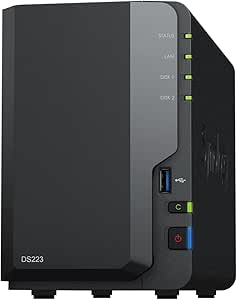 | Best for Easy Private Cloud & Surveillance in Small Environments | Brand: Synology | Model Number: DS223 | Number of Bays: 2 | VIEW ON AMAZON | See Our Full Breakdown |
| UGREEN NAS DXP2800 2-Bay for Advanced Home Users, Remote Workers & Creators |  | Best for Large Libraries & AI-Enhanced Surveillance | Digital Storage Capacity: 80 TB | Hard Disk Interface: SATA | Connectivity Technology: SATA | VIEW ON AMAZON | See Our Full Breakdown |
| Synology DS1525+ 5-Bay NAS with 8GB RAM and 20TB Bundle |  | Best for Scalability & Virtualization in Growing Business Environments | Number of Bays: 5 | RAM: 8GB | Maximum Storage Capacity: 300 TB with expansion | VIEW ON AMAZON | See Our Full Breakdown |
| Synology DS425+ Private Cloud Media Server – 4-Bay Diskless NAS |  | Best for Multi-User Business Environments & Data Sharing | Brand: Synology | Model Number: DS425+ | Number of Bays: 4 | VIEW ON AMAZON | See Our Full Breakdown |
| MINISFORUM N5 MAX 5-Bay Desktop NAS with AMD Ryzen AI Max+ 395 |  | Best Overall for High-Performance Content Creation and Business Use | Processor: AMD Ryzen AI Max+ 395, 16 cores, up to 5.1GHz | Memory: 64GB LPDDR5x RAM | Storage Capacity: 200TB (160TB HDD + 40TB SSD) | VIEW ON AMAZON | See Our Full Breakdown |
| Synology DS225+ Private Cloud Media Server – 2-Bay Diskless NAS with Intel CPU for Hardware Transcoding |  | Best for Home Media Streaming and Small-Scale Backup | Storage: 2-Bay Diskless | Processor: Intel CPU | Transfer Speed: 282 MB/s | VIEW ON AMAZON | See Our Full Breakdown |
| BUFFALO LinkStation 220 4TB 2-Bay NAS Network Attached Storage with Hard Drives Included |  | Best for Easy Setup and Personal Cloud Storage | Brand: BUFFALO | Model Number: LS220D0402 | Storage Capacity: 4TB | VIEW ON AMAZON | See Our Full Breakdown |
| Synology DiskStation DS925+ (Diskless) |  | Best for Scalable Storage and Data Management | Model: DS925+ | Number of Bays: 4 (expandable to 9) | Drive Compatibility: Supports drives on official compatibility list | VIEW ON AMAZON | See Our Full Breakdown |
| Synology DS225+ 2-Bay DiskStation NAS with 8TB Bundle |  | Best for Reliable, Flexible Storage with Expandability | Processor: Intel Celeron J4125 Quad-Core | Memory: 2 GB DDR4, expandable to 6 GB | Storage Bays: 2 | VIEW ON AMAZON | See Our Full Breakdown |
| premium nas storage solution | Warranty | Number of Bays |
|---|---|---|
| UGREEN NAS DXP4800 GT 4-Bay fo | — | — |
| Synology DS1525+ Video Editing | 3 years | 5 |
| Asustor Drivestor 4 Gen 2 AS12 | — | 4 |
| UGREEN DXP4800 Plus 4-Bay NAS | — | — |
| Asustor Flashstor 6 FS6706T | 3 years | — |
| Synology 2-Bay DiskStation DS2 | 2 years | 2 |
| Synology DS223 Home & Office 2 | 2 years | 2 |
| UGREEN NAS DXP2800 2-Bay for A | 2 years | — |
| Synology DS1525+ 5-Bay NAS wit | — | 5 |
| Synology DS425+ Private Cloud | 3 years | 4 |
| MINISFORUM N5 MAX 5-Bay Deskto | — | — |
| Synology DS225+ Private Cloud | 3 Years | — |
| BUFFALO LinkStation 220 4TB 2- | 2 years | 2 |
| Synology DiskStation DS925+ | 3 years | 4 (expandable to 9) |
| Synology DS225+ 2-Bay DiskStat | — | — |
More Details on Our Top Picks
UGREEN NAS DXP4800 GT 4-Bay for Creators, Tech Enthusiasts, and Office Teams
The UGREEN DXP4800 GT stands out for its robust processing power with an AMD Ryzen Embedded R2514, making it suitable for demanding workflows like media editing and virtualization. Compared with the Synology DS1525+, it offers more hardware customization options and built-in surveillance features, but comes with a more complex setup and no included drives. Its dual 10GbE ports enable lightning-fast data transfers, ideal for small teams that need quick access to large files. The expandability of RAM and storage ensures this NAS remains viable as needs grow, though the non-ECC RAM and additional drive purchases are tradeoffs to consider. Overall, this model excels for tech-savvy users who want a versatile, future-proof NAS that handles heavy workloads, but it requires some technical skill to configure fully.
Pros:- Dual 10GbE ports with link aggregation for rapid data transfer
- Supports extensive storage options with multiple SSD/HDD configurations
- Built-in surveillance system for IP camera management
- Expandable RAM and storage for future needs
Cons:- Drives not included, requiring additional purchase
- Complex setup for advanced features like virtual machines and Docker
- Pre-installed RAM is non-ECC, upgrading requires compatible modules
Best for: Small businesses, creative studios, and tech enthusiasts seeking maximum performance and expandability.
Not ideal for: Users preferring plug-and-play simplicity or those with limited technical experience, since setup and configuration are more involved.
- Processor:AMD Ryzen Embedded R2514, 4 cores, up to 3.70GHz
- RAM:8GB DDR4, expandable to 64GB
- Storage Capacity:Up to 144TB (4 bays, 32TB each, with NVMe SSD options)
- Network:Dual 10GbE ports, supports link aggregation
- Drive Bays:4 SATA, 2 U.2 NVMe, 2 M.2 SSD slots
- Connectivity:USB 3.2, USB-C, HDMI, SD card slot
Our verdict“This NAS is best suited for tech-savvy small teams and creative professionals demanding high performance and customization.”
Synology DS1525+ Video Editing & Production Server – 5-Bay NAS, 300TB Capacity, 10GbE Ready
The Synology DS1525+ makes the list for its outstanding network speeds, supporting over 1,180 MB/s transfer rates, and its massive expandable storage up to 300TB. This is a clear choice for media professionals working with 4K and 8K footage, especially when compared to the Asustor Drivestor 4, which offers fewer bays and less raw speed. Although its setup can be complex and requires additional units for maximum capacity, the advanced media management features like AI tagging streamline content organization for teams. The 3-year warranty adds confidence for long-term use, but the premium price might be a barrier for smaller budgets. For those needing a storage-centric solution with high-speed editing capabilities and multi-user support, this NAS delivers.
Pros:- High-speed over 1,180 MB/s transfer rates for quick editing
- Supports expansion up to 300TB for large media libraries
- Optimized for multi-user access and collaborative workflows
- Advanced AI media management tools
Cons:- Requires additional units for full expansion, increasing setup costs
- Setup may be difficult for users unfamiliar with enterprise-grade NAS
- Premium pricing might not suit casual or home users
Best for: Professional video editors, media production teams, and collaborative content creators needing extensive, fast storage.
Not ideal for: Home users or small offices with limited budgets, due to its high cost and setup complexity.
- Capacity:Up to 300TB
- Number of Bays:5
- Network Compatibility:10GbE Ready
- Warranty:3 years
- Use Case:Video editing, media library, multi-user workflows
Our verdict“This NAS is ideal for media professionals who need fast, expandable storage and sophisticated media management tools.”
Asustor Drivestor 4 Gen 2 AS1204T 4-Bay NAS
The Asustor Drivestor 4 Gen 2 offers a solid choice for users seeking reliable, flexible storage with decent network speed thanks to its 2.5GbE port. Compared with the UGREEN DXP4800 GT, it is simpler to set up and more affordable, but it has fewer advanced features and less raw power. Its flexible RAID options make it suitable for redundancy and data security, and support for 4K media streaming adds media versatility. However, its limited RAM and diskless design mean it’s better suited for light workloads and home environments rather than heavy multitasking or enterprise use. This model makes sense for those who need a straightforward, dependable NAS for backups and media sharing without the complexity of high-end features.
Pros:- Fast 2.5GbE network for quick file transfers
- Flexible RAID configurations for redundancy
- Supports 4K media streaming and personal cloud access
- User-friendly, tool-free installation
Cons:- Limited 1GB RAM may hinder multitasking performance
- No included drives, additional purchase needed
- Basic feature set compared to higher-tier enterprise NAS
Best for: Home users and small offices needing reliable backups and 4K media streaming without complex configurations.
Not ideal for: Power users or media professionals requiring high-speed editing or virtualization, due to limited RAM and processing power.
- Processor:Realtek RTD1619B 1.7GHz Quad-Core
- Memory:1GB DDR4
- Network:2.5GbE Port
- Number of Bays:4
- Supported RAID:0/1/5/6/10
- Form Factor:Desktop
Our verdict“This NAS is best for home or small office users looking for reliable backups and media streaming in a straightforward package.”
UGREEN DXP4800 Plus 4-Bay NAS for Families, Creators & Small Teams
The UGREEN DXP4800 Plus offers a compelling combination of high capacity and advanced features like Docker and virtual machines, making it well-suited for small teams, families, and content creators. Its 8GB DDR5 RAM and dual 10GbE ports provide fast, reliable data access, outperforming many similarly priced NAS devices like the Asustor Drivestor 4 in speed and expandability. While drives are not included, its support for extensive storage up to 144TB and AI-powered photo organization makes it a versatile choice. The inclusion of HDMI and USB connectivity enhances its media capabilities, but the need for additional drive purchases and lack of built-in Wi-Fi limit its convenience for casual users. This pick makes sense for users who want a high-performance, feature-rich NAS for multimedia and business tasks.
Pros:- High storage capacity up to 144TB for large data libraries
- Fast transfer speeds with 10GbE and USB ports
- Supports advanced features like Docker and virtual machines
- Secure encryption and flexible permission management
Cons:- Hard drives are not included, additional purchase required
- No built-in Wi-Fi, wired Ethernet required
- Setup and configuration can be complex for less experienced users
Best for: Small teams, content creators, and tech-savvy families needing centralized, high-capacity storage with advanced features.
Not ideal for: Users seeking a simple, plug-and-play NAS or those with limited technical expertise, due to setup complexity.
- Digital Storage Capacity:144 TB
- Hard Disk Interface:Serial ATA
- Connectivity Technology:Ethernet, HDMI, SATA, USB
- Processor:Intel 5-Core CPU
- RAM:8GB DDR5
- Network Ports:1x 10GbE, 1x 2.5GbE
Our verdict“This NAS is ideal for small teams and creators who need robust, high-capacity storage with advanced virtualization features.”
Asustor Flashstor 6 FS6706T – 6 Bay All-SSD NAS Storage, Quad Core 2.0GHz, Six M.2 SSD, Dual 2.5GbE, 4GB RAM DDR4, Diskless
The Asustor Flashstor 6 FS6706T excels in delivering ultra-fast data access for demanding creative tasks thanks to its six M.2 NVMe SSD slots and dual 2.5GbE ports. It’s an excellent choice for professionals who need quick access to large files and smooth 4K media playback, outperforming traditional HDD-based NAS like the UGREEN DXP4800 GT in speed. The compact, diskless design offers flexibility but requires purchasing SSDs separately, which can add to the overall cost. Its 4GB DDR4 RAM supports hardware transcoding and media workflows, yet the limited RAM may restrict multitasking in heavy-use scenarios. Overall, this NAS makes a compelling option for creators focused on performance and media editing, though it’s less suited for those seeking larger storage capacities or enterprise features.
Pros:- High-speed all-flash NVMe SSD performance
- Dual 2.5GbE network ports for fast transfer
- Supports 4K media playback and hardware transcoding
- Compact, quiet design suitable for studio environments
Cons:- Requires purchasing SSDs separately, increasing initial cost
- Limited RAM for multitasking, only 4GB DDR4
- No included drives, additional investment needed
Best for: Creative professionals and media editors requiring fast, all-flash storage for 4K/8K workflows and hardware transcoding.
Not ideal for: Users needing large, expandable storage or those on a tight budget, since SSDs and higher RAM would increase costs.
- Processor:Intel Celeron N5105, 2.0GHz quad-core
- Storage Slots:6x M.2 NVMe SSD
- Network Connectivity:Dual 2.5GbE
- Memory:4GB DDR4
- Form Factor:Diskless
- Warranty:3 years
Our verdict“This NAS is best for creative professionals who prioritize speed and media processing over large storage capacity.”
Synology 2-Bay DiskStation DS223j (Diskless)
The Synology DS223j stands out for its compact, energy-efficient design that suits small-scale private cloud setups. Compared with the DS223, it offers similar multi-device sharing and backup features but with a slightly more streamlined build. Its main tradeoff is the limited two-bay capacity, making it less suitable for users with growing storage needs. This model is ideal for individuals or small households prioritizing simplicity and reliability without extensive expansion. However, users needing high scalability or large storage pools will find it restrictive. Pros include its energy efficiency, built-in surveillance, and solid warranty. Cons involve the limited bays and the need for initial setup. Verdict: Perfect for users seeking a dependable, low-maintenance NAS for basic file sharing and backups.Pros:- Compact and energy-efficient design
- Supports private cloud creation and multi-device sharing
- Includes surveillance and automated backup features
Cons:- Limited to two bays, restricting expansion
- Requires initial setup and configuration for optimal use
Best for: Small households or individuals wanting a simple, reliable private cloud.
Not ideal for: Power users or expanding businesses needing larger, scalable storage capacity.
- Brand:Synology
- Model Number:DS223j
- Number of Bays:2
- Built-In Media:Yes
- Warranty:2 years
- UPC:846504004768
Our verdict“Best Overall for Compact, Reliable Private Cloud — Compact and energy-efficient design”
Synology DS223 Home & Office 2-Bay Diskless NAS
The Synology DS223 offers a straightforward solution for home and small office users seeking centralized storage. It excels in ease of setup, especially for users unfamiliar with NAS devices, and supports comprehensive features like remote access, backups, and surveillance monitoring. Compared with the DS223j, this model emphasizes user-friendly management and slightly broader connectivity options. Its main limitation is the two-bay capacity, which may not meet the needs of users with large or growing data collections. It’s best suited for small teams or families who want simple data protection with added security features. Advanced users might find its capabilities somewhat limited without customization options. Pros include its simple management interface, surveillance integration, and reliable hardware. Cons involve the lack of included drives and some need for technical knowledge for advanced features. Verdict: An excellent choice for small offices or families prioritizing ease and security over high scalability.Pros:- Easy to set up and manage private cloud
- Supports automated backups and remote access
- Includes surveillance features with IP camera support
Cons:- Limited to 2 bays, not suitable for large data pools
- No drives included, additional purchase needed
Best for: Small offices or families seeking user-friendly private cloud and surveillance features.
Not ideal for: Power users or those with large, scalable storage needs requiring multiple bays and expansion.
- Brand:Synology
- Model Number:DS223
- Number of Bays:2
- Item Type:NAS
- Warranty:2 years
- UPC:846504004775
Our verdict“Best for Easy Private Cloud & Surveillance in Small Environments — Easy to set up and manage private cloud”
UGREEN NAS DXP2800 2-Bay for Advanced Home Users, Remote Workers & Creators
The UGREEN DXP2800 caters to advanced users needing substantial digital storage, supporting up to 80TB. It’s a compelling option for creators or remote workers managing large media libraries, thanks to its powerful Intel N100 CPU and 8GB DDR5 RAM. Its AI-powered surveillance features, including face and pet recognition, set it apart from typical NAS devices like the Synology models. Compared with the Synology DS223, this device emphasizes multimedia handling and home security, but it also brings complexity: HDDs and SSDs are sold separately, requiring additional investment. Its design favors tech-savvy users comfortable with hardware choices and setup. If you’re seeking a straightforward NAS, this might be overkill; but for those needing extensive capacity and AI features, it’s a strong contender. Pros include high capacity, robust processing power, and advanced surveillance. Cons involve additional costs for drives and complexity in setup. Verdict: Ideal for creators and tech enthusiasts who need large, flexible storage with intelligent security features.Pros:- Supports up to 80TB of storage for large collections
- Powered by a robust Intel N100 CPU with 8GB DDR5 RAM
- Features AI-powered face and pet recognition surveillance
Cons:- HDDs/SSDs sold separately, increasing initial investment
- Designed for advanced users, not plug-and-play
Best for: Advanced home users or creators managing large media libraries and needing AI security.
Not ideal for: Beginners or users seeking simple plug-and-play storage solutions, due to setup complexity.
- Digital Storage Capacity:80 TB
- Hard Disk Interface:SATA
- Connectivity Technology:SATA
- Dust Resistant:Yes
- Hard Disk Form Factor:3.5 inches
- Warranty:2 years
Our verdict“Best suited for users needing high-capacity, intelligent storage with multimedia and security focus.”
Synology DS1525+ 5-Bay NAS with 8GB RAM and 20TB Bundle
The Synology DS1525+ offers impressive scalability for expanding storage needs, supporting up to 300TB with an expansion unit. It’s a strong choice for small to medium-sized businesses that require fast network connectivity, thanks to dual 2.5 GbE ports, and the flexibility to run virtual machines with support for VMware, Hyper-V, and more. Compared with the DS425+, its higher bay count and expandability make it suitable for larger data pools, but it involves a more complex initial setup and additional hardware investments for maximum capacity. This device is less ideal for casual users or small offices with minimal growth plans. It excels in environments where future-proofing and virtualization are priorities. Pros include high scalability, fast network ports, and versatile virtual hosting capabilities. Cons involve the need for additional expansion hardware and a potentially steep learning curve. Verdict: Geared toward growing businesses needing scalable, high-performance storage solutions with virtualization support.Pros:- Supports up to 300 TB with expansion
- Fast 2.5 GbE network ports and support for 10 GbE
- Versatile platform for file sharing, backups, virtualization, and surveillance
Cons:- Requires separate purchase of expansion units for full capacity
- Initial setup can be complex for less experienced users
Best for: Small to medium enterprises requiring scalable, virtualized storage solutions.
Not ideal for: Casual users or small offices with minimal data growth or virtualization needs.
- Number of Bays:5
- RAM:8GB
- Maximum Storage Capacity:300 TB with expansion
- Network Ports:2x 2.5 GbE
- Supported Virtualization:VMware vSphere, Hyper-V, Citrix, OpenStack
- Included HDDs:5x 4TB Seagate Ironwolf
Our verdict“Best for growing organizations needing scalable, high-performance NAS with virtualization capabilities.”
Synology DS425+ Private Cloud Media Server – 4-Bay Diskless NAS
The Synology DS425+ offers a compact yet powerful platform for data sharing, backup, and surveillance in business settings. Its high network transfer speeds of 278 MB/s facilitate multi-user access without bottlenecks, and support for up to 30 IP cameras makes it suitable for security-focused environments. Compared with the DS223 models, it leans toward business use, with a 3-year warranty and more advanced data protection features. Its main drawback is the need for users to configure it properly, especially as it does not include drives, which adds to the initial cost. This device is best for small to medium businesses that require robust multi-user data access and security features, but overkill for casual or home users. Pros include high transfer speeds, multi-user support, and surveillance integration. Cons involve setup complexity and the need for separate drive purchases. Verdict: An excellent choice for professional environments needing reliable multi-user access and security-focused data sharing.Pros:- High network transfer speeds
- Supports multiple concurrent users
- Includes surveillance support for up to 30 cameras
Cons:- Requires setup and technical knowledge
- No drives included, additional costs involved
Best for: Small to medium businesses requiring high-speed, multi-user data sharing and surveillance.
Not ideal for: Home users or casual users who do not need enterprise-level performance or multi-camera support.
- Brand:Synology
- Model Number:DS425+
- Number of Bays:4
- Network Speed:278 MB/s
- Supported Cameras:30 IP cameras
- Warranty:3 years
Our verdict“Ideal for businesses needing fast, multi-user data sharing with integrated surveillance capabilities.”
MINISFORUM N5 MAX 5-Bay Desktop NAS with AMD Ryzen AI Max+ 395
The MINISFORUM N5 MAX stands out for its impressive processing power, thanks to the AMD Ryzen AI Max+ 395 with 16 cores and 126 TOPS. Compared to the Synology DS925+, it offers raw speed and AI capabilities that make it ideal for intensive multimedia editing, AI processing, and large-scale data management. Its massive 200TB capacity and flexible RAID options support demanding environments, although the setup requires technical knowledge, and its size may challenge space-constrained locations. The modular design facilitates upgrades, but the diskless configuration means additional drives are necessary for full storage. This NAS is best suited for advanced users needing high throughput and AI processing, while less experienced users or those prioritizing simplicity may find it daunting.
Pros:- Powerful AMD Ryzen AI Max+ 395 processor with 126 TOPS for AI and multimedia tasks
- Massive 200TB total storage capacity with RAID flexibility
- Dual 10GbE ports enable high-speed network aggregation
- Modular design supports easy upgrades and maintenance
Cons:- Requires technical skills for optimal installation and setup
- Diskless configuration demands additional drives for storage needs
- Large footprint may not fit in small or cluttered spaces
Best for: Content creators, AI developers, and small businesses needing high performance and large storage pools
Not ideal for: Users seeking a plug-and-play solution or with limited technical expertise, due to setup complexity and size
- Processor:AMD Ryzen AI Max+ 395, 16 cores, up to 5.1GHz
- Memory:64GB LPDDR5x RAM
- Storage Capacity:200TB (160TB HDD + 40TB SSD)
- SSD:128GB pre-installed
- HDD Slots:5x SATA HDD, 5x M.2 NVMe SSD
- Network Ports:2x 10GbE Ethernet
- Form Factor:Desktop, 3.5-inch
- Cooling:Dual axial fans
- Additional Features:MinisCloud OS, RAID support, AI photo/video processing, remote access
Our verdict“This pick makes the most sense for tech-savvy professionals who need raw power, AI capabilities, and extensive storage capacity.”
Synology DS225+ Private Cloud Media Server – 2-Bay Diskless NAS with Intel CPU for Hardware Transcoding
The Synology DS225+ is a compact yet capable NAS that excels at media streaming and simple backups. Its Intel processor supports hardware transcoding, making 4K media playback seamless on multiple devices, a step above the basic DS223+ which lacks transcoding power. While its 2-bay design limits total storage, it provides a robust platform for automated backups and RAID redundancy, suitable for small households or light business use. Setting it up might be complex for those unfamiliar with Synology’s DSM interface, and you’ll need to add drives to reach your desired capacity. If your needs center around media and small-scale cloud storage, this model offers a balanced mix of features and ease of use, though it isn’t ideal for large storage demands or advanced enterprise tasks.
Pros:- Supports 4K media streaming and hardware transcoding for smooth playback
- Reliable RAID and snapshot features for data protection
- Built-in surveillance support with AI detection
- Compact and energy-efficient design
Cons:- Requires additional disks for storage expansion
- Setup can be challenging for beginners unfamiliar with DSM
- Limited to 2 drive bays restricts maximum storage
Best for: Home users and small offices prioritizing media streaming, backups, and surveillance support
Not ideal for: Power users needing large or expandable storage, or those with complex multi-user environments
- Storage:2-Bay Diskless
- Processor:Intel CPU
- Transfer Speed:282 MB/s
- Surveillance Support:Up to 30 IP cameras
- Warranty:3 Years
- Additional Features:RAID, automated backups, AI detection
Our verdict“Ideal for home media enthusiasts and small-scale backups, but not suited for large storage needs or enterprise environments.”
BUFFALO LinkStation 220 4TB 2-Bay NAS Network Attached Storage with Hard Drives Included
The BUFFALO LinkStation 220 offers a straightforward, budget-friendly solution for users who want basic NAS functionality with pre-installed drives. Its 4TB capacity and RAID support provide simple redundancy, making it suitable for personal backups and file sharing without the complexity of enterprise systems. Compared to the Synology DS225+, it’s more of a plug-and-play device with hard drives included, ideal for less tech-savvy users who want immediate access. However, the limited capacity in RAID 1 mode and lack of advanced features mean it’s best suited for small households or individuals with modest storage needs. This device makes sense for those who prioritize ease of use over expandability or high performance.
Pros:- Includes hard drives and software for fast setup
- Supports RAID 0 and 1 for data redundancy and performance
- Secure file sharing and automated backup features
- No monthly fees or cloud subscriptions
Cons:- Limited to 4TB total capacity in RAID 1 mode
- Requires some network configuration knowledge
- Basic feature set compared to more advanced NAS units
Best for: Home users seeking quick setup, reliable backups, and personal cloud access with minimal fuss
Not ideal for: Power users or businesses needing scalable or high-capacity solutions
- Brand:BUFFALO
- Model Number:LS220D0402
- Storage Capacity:4TB
- Number of Bays:2
- RAID Support:Yes (RAID 0 and RAID 1)
- Supported Operating Systems:Windows, macOS
- Warranty:2 years
- Included Items:NAS server, network cable, software
Our verdict“A solid choice for newcomers and casual users who want simple, reliable local storage with minimal setup.”
Synology DiskStation DS925+ (Diskless)
The Synology DS925+ offers a versatile platform for expanding storage and managing data efficiently. Its support for up to nine drives with expansion units surpasses the 4-bay DS225+ and makes it suitable for growing business needs. Dual 2.5GbE ports enable faster network throughput, especially when combined with link aggregation. The built-in NVMe slots for caching significantly boost performance for intensive workloads, making it a flexible all-in-one solution. While the setup may challenge beginners and the price is higher, the ability to scale and customize makes it a better long-term investment than smaller models. Compared with the DS223+, it provides more expansion options, appealing to users with evolving storage needs and demanding applications.
Pros:- Supports up to nine drives with expansion units
- High-speed data transfer with dual 2.5GbE ports
- Built-in NVMe caching slots for performance enhancement
- Flexible for virtualization, backups, and surveillance
Cons:- Requires additional expansion units for more than four drives
- Complex setup for those unfamiliar with Synology DSM
- Higher cost compared to smaller or simpler NAS options
Best for: Small to medium-sized businesses and advanced home users seeking expandable and high-performance storage
Not ideal for: Users with limited budgets or those who need simple, out-of-the-box solutions without expansion
- Model:DS925+
- Number of Bays:4 (expandable to 9)
- Drive Compatibility:Supports drives on official compatibility list
- Maximum Sequential Read/Write:522/565 MB/s
- Network Ports:2 x 2.5GbE
- Expansion Support:Up to 9 drives with expansion unit
- NVMe Slots:2
- Warranty:3 years
Our verdict“Designed for users who need scalable, high-speed storage capable of handling growing data demands and intensive workloads.”
Synology DS225+ 2-Bay DiskStation NAS with 8TB Bundle
The Synology DS225+ provides a dependable solution for users who want versatile storage with room for growth. Its Intel Celeron J4125 processor and expandable 6GB memory support smooth multi-tasking, especially when handling backups, file sharing, and virtualization. Compared to the 2-bay DS223j, it offers more advanced data protection features like Btrfs snapshots. The included 8TB (2x 4TB) drives make it immediately functional, though the total capacity may fall short for users with larger storage needs. Its support for Synology Hybrid RAID (SHR) and third-party drives offers flexibility, but the limited bay count restricts maximum storage expansion. This model makes sense for users wanting a balance of performance, expandability, and data integrity in a compact form.
Pros:- Expandable memory up to 6GB for better multitasking
- Supports third-party drives and SHR for flexible storage management
- Includes 8TB bundle for immediate use
- Reliable RAID and snapshot features
Cons:- Limited to 2 drive bays, restricting maximum capacity
- Additional drives needed for larger storage needs
- Price may be higher relative to capacity for some users
Best for: Small businesses and tech-savvy home users seeking flexible, expandable storage with advanced protection
Not ideal for: Users with large data storage requirements or those preferring simple, non-expandable solutions
- Processor:Intel Celeron J4125 Quad-Core
- Memory:2 GB DDR4, expandable to 6 GB
- Storage Bays:2
- Network Ports:1 x 2.5 GbE, 1 x 1 GbE
- Included Storage:8TB (2x 4TB Seagate Ironwolf drives)
- Features:Btrfs snapshot, SHR, expandable RAM
Our verdict“Best suited for small-scale environments where flexible, reliable storage with growth potential is desired, but not for those needing extensive capacity upfront.”

How We Picked
These NAS storage solutions were selected based on their performance, build quality, expandability, and feature sets relevant to demanding users. I prioritized models with high reliability, fast data transfer options, and advanced management capabilities suitable for professional use. Cost and value were also considered, ensuring options span different budgets within the premium category. Products were ranked by how well they balance these factors, with a focus on future-proofing and ease of maintenance, to help buyers identify solutions that truly deliver long-term value.
Factors to Consider When Choosing Premium Nas Storage Solutions
Choosing a premium NAS storage solution requires understanding several key factors that influence performance, scalability, and usability. Beyond raw specs, it’s important to consider how well a device integrates into your existing setup and future growth plans. This guide highlights the most critical aspects to evaluate, helping you avoid common pitfalls and make an informed investment.Capacity and Scalability
Assess your current storage needs and consider future growth. Premium NAS devices often support multiple drive bays and expandability options like additional modules or external connections. Investing in a slightly over-capacity solution can save money long-term, but overinvesting may lead to unnecessary expense. Balancing immediate needs with scalability ensures your storage solution remains effective as your data grows.
Performance and Speed
Performance is critical for demanding tasks like 4K video editing or large-scale backups. Look for models with high transfer rates, fast processors, and sufficient RAM. The inclusion of 10GbE or higher network interfaces can dramatically reduce data bottlenecks, especially in multi-user environments. Remember, the fastest NAS is only beneficial if your network infrastructure can support those speeds.
Build Quality and Reliability
Premium NAS devices often feature enterprise-grade hardware, including robust cooling, redundant power supplies, and durable chassis. These features reduce downtime and improve longevity. However, higher build quality typically comes with increased cost. Carefully evaluate warranty and support options, as well as user reviews for insights into real-world reliability.
Ease of Use and Management
User-friendly interfaces, comprehensive management tools, and clear documentation make a significant difference, especially for complex setups. Premium solutions often include advanced features like virtualization support, snapshot backups, and detailed analytics. Consider your technical comfort level and whether you prefer a plug-and-play experience or a highly configurable system.
Cost and Total Value
While premium NAS solutions tend to be more expensive upfront, consider the total cost of ownership, including maintenance, expansion, and energy consumption. Sometimes, investing in a slightly pricier model with better support and longer lifespan offers better value. Avoid sacrificing essential features for initial savings, as this can lead to higher costs later in upgrades or repairs.
Frequently Asked Questions
Is it worth paying extra for enterprise-grade hardware in a NAS?
Investing in enterprise-grade hardware can significantly enhance reliability, uptime, and longevity, especially if your data is mission-critical. These systems often feature redundant components, better cooling, and more durable materials, reducing the risk of failure. The higher initial cost can be justified if you require consistent performance and minimal downtime, though for less demanding uses, mid-range models may suffice.
How important is network speed in a premium NAS?
Network speed becomes a key factor as data volumes grow and multiple users access the NAS simultaneously. Models with 10GbE or higher interfaces offer much faster data transfer rates, reducing bottlenecks during large file transfers or streaming. If your network infrastructure supports these speeds, choosing a NAS with such interfaces can make a noticeable difference in overall productivity and user experience.
Should I prioritize capacity or performance in a premium NAS?
This depends on your primary use case. If you handle large media files or frequent backups, capacity and expandability might be more critical. Conversely, if real-time access and editing are needed, performance—especially SSD caching and fast network connections—should take precedence. Many premium models offer a balance, but clarifying your main tasks will help you allocate your budget wisely.
Can I upgrade or expand a premium NAS later?
Many premium NAS solutions support expansion through additional drive bays, external ports, or modular components, allowing you to scale over time. However, the upgrade path varies: some models are more flexible than others. It’s important to verify the support for future expansion and compatibility before purchasing, especially if you anticipate significant growth or evolving data needs.
What is the typical lifespan of a premium NAS device?
High-quality NAS units generally last between 5 to 7 years, depending on usage and maintenance. Premium models with enterprise-grade hardware tend to have longer lifespans due to better components and cooling systems. Regular firmware updates, proper cooling, and proactive maintenance can extend the operational life, ensuring your investment remains valuable over time.
Conclusion
For users seeking the best overall experience, the Synology DS1525+ offers a balanced combination of capacity, performance, and expandability. Those prioritizing value should consider models like the Synology DS223 for their affordability and solid feature set. Creators and demanding professionals will benefit most from high-speed options like the Asustor Flashstor 6 FS6706T. Beginners or small teams should start with more straightforward, user-friendly solutions like the Synology DS225+. Ultimately, the right choice depends on your current needs and future plans—consider these factors carefully to select the ideal premium NAS for 2026.
Evergreen bestsellers Picks

Vitamix VX3 Professional-Grade Blender with BlendPilot, 48 oz, Black
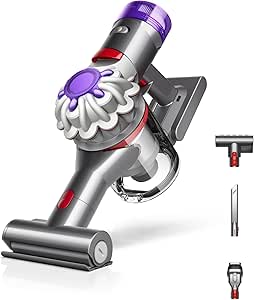
Dyson Car+Boat Cordless Handheld Vacuum

LG 55-Inch QNED73B Mini LED 4K Smart TV (2026)
As an affiliate, we earn on qualifying purchases.